Unable to open PPT from Sharepoint

Anonymous
2021-04-16T07:46:49+00:00

Hi Team,

we are trying to open PPT files from Office.com and from Teams, we have a O365 subscription. When we are try to open the file in app, it prompts us to open the Microsoft Store as it is not able to locate MS PowerPoint. We have O365 installed and are able to create/edit PPT files in PowerPoint.

The issue is only when we are trying to open files from Team or from Office.com.

Microsoft 365 and Office | PowerPoint | For home | Windows

Locked Question. This question was migrated from the Microsoft Support Community. You can vote on whether it's helpful, but you can't add comments or replies or follow the question.

0 comments No comments
{count} votes
Answer accepted by question author
  1. Anonymous
    2021-04-16T09:34:07+00:00

    Hi ZaurezMD,

    Thank you for your post in our forum. And we will try our best to help you if we can do something.

    Per your description, may I take it that you want to open presentations from PowerPoint online and Teams app via clicking “Open in Desktop app”?
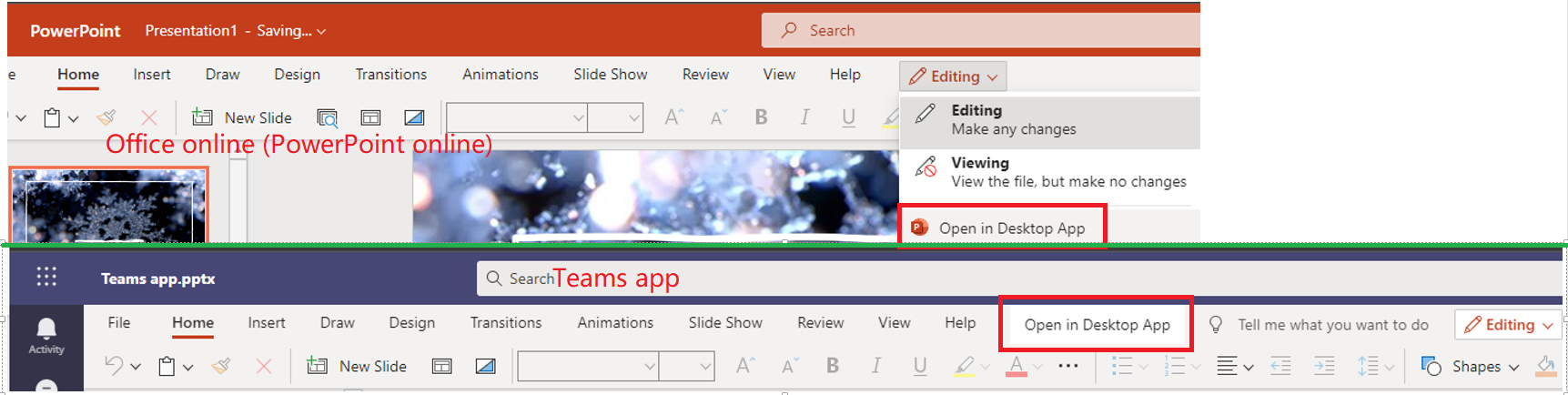
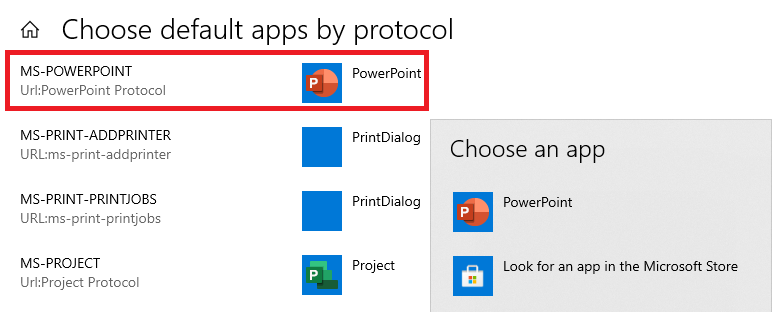
    If so, we would suggest you can check whether the default app by protocol has been set as the correct option. Type Settings in the search box at the left bottom corner > Apps > Default apps > scroll down to select Choose default apps by protocol > Scroll down to find MS-POWERPOINT Url:PowerPoint Protocol, and please choose PowerPoint.
    However, if the above method doesn’t work, to help you narrow down the problem, we sincerely suggest you can post back with the below information.

    1. May I confirm that you open the presentations which are saved in OneDrive or SharePoint via the PowerPoint app directly? You can test: open PowerPoint app > File > Open > select OneDrive or SharePoint to open cloud presentation.
    2. May I know all your colleagues have the same problem on their own devices? Or the problem only happens to the specific devices, or the specific user's account, or the specific PowerPoint files?
    3. Does the problem persist when open Office online in InPrivate or Incognito browser?
    4. Does the problem only happen to the PowerPoint app? How about Word, Excel app?

    Best regards,

    Cindy

    0 comments No comments

3 additional answers

Sort by: Most helpful
  1. Anonymous
    2021-04-19T10:12:23+00:00

    Hi ZaurezMD,

    Welcome to share any updates when you have time if you need further help on this question.

    Best regards,

    Cindy

    0 comments No comments
  2. Anonymous
    2021-07-02T15:53:23+00:00

    Hi Cindy,

    I have exactly the same issue.
    When I am trying to assign a default program to Url:PowerPoint Protocol via the "Choose a default" button,


    for some to me unknown reason it shows only the Microsoft Store option but not PowerPoint which is installed on my laptop:

    Do you have any ideas what might go wrong or any suggestions on how to fix it?

    Thank you
    Alexander

    0 comments No comments
  3. Anonymous
    2021-07-29T19:17:39+00:00

    Hi Cindy,

    I have exactly the same issue.
    When I am trying to assign a default program to Url:PowerPoint Protocol via the "Choose a default" button,

    Image
    for some to me unknown reason it shows only the Microsoft Store option but not PowerPoint which is installed on my laptop:

    Image

    Do you have any ideas what might go wrong or any suggestions on how to fix it?

    Thank you
    Alexander

    I am experiencing the same issue as the post above. The only option I see is to "Look for an app in the Microsoft Store". I reinstalled Office 365 to no avail. Cleared the Cache on the browser and have tried with Chrome and Edge. Very frustrating. Please help.

    Thanks,

    Craig D.

    It Operations Technician

    5 people found this answer helpful.
    0 comments No comments