Select Data Source Dialog Box not appearing (Windows)

Anonymous
2020-10-21T12:06:54+00:00

When in powerpoint on a chart, the "select data source dialog box" does not appear anymore... The excel with the data source opens (same when I click on edit data) but not the dialog box so I'm not able to select the data needed. Any idea on how can I fix this and see the dialog box again?

Thanks

Microsoft 365 and Office | PowerPoint | For home | Windows

Locked Question. This question was migrated from the Microsoft Support Community. You can vote on whether it's helpful, but you can't add comments or replies or follow the question.

0 comments No comments
{count} votes

3 answers

Sort by: Most helpful
  1. Anonymous
    2020-10-21T13:21:25+00:00

    Hi Bijoy,

    Thanks for posting in the community.

    According to your description, I assume you mean the Select Data Source window in the screenshot. If so, it works well on my side and I would like to collect more information.

    1. May I re-confirm whether the dialog box will pop on when you click Chart Design > Select Data?
    2. Does the issue exist a specific document or all documents? You could create a new document to test.
    3. Your Office version

    Click File> Account, take a screenshot including Product Information and About PowerPoint
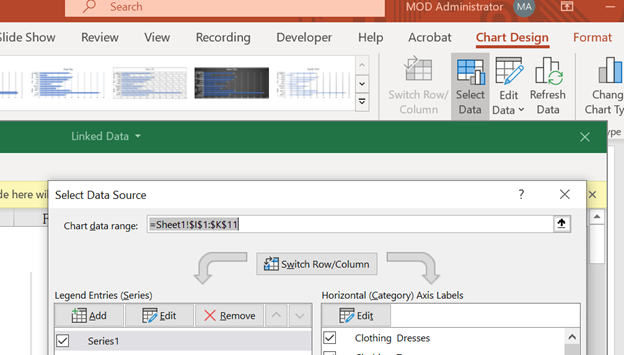
    If my understanding conflicts your meaning, please describe more details about the issue.

    Regards,

    George

    1 person found this answer helpful.
    0 comments No comments
  2. Anonymous
    2020-10-21T13:35:45+00:00

    Thank you for your prompt reply George.

    I have noticed that this issue occurs with charts create outside Microsoft 365.

    For e.g. charts from Office 2013 when opened in Microsoft 365 PowerPoint, the "Select Data Source" window (as shown in the screenshot) does not appear. Whereas, charts created in a new PowerPoint using Microsoft 365 account works fine. 

    Is there some compatibility issue here?

    0 comments No comments
  3. Anonymous
    2020-10-22T15:10:12+00:00

    Hi Bijoy,

    Thanks for posting back.

    Since it works well in a new document, please create a new document and use Reuse Slides feature (Home> Reuse Slides) to reinsert the slides and check whether the issue exists.

    If you have any updates, please feel free and come back to share with us.

    Regards,

    George

    1 person found this answer helpful.
    0 comments No comments