Hi EverdayDesigner,
Unlike the Microsoft Word, the PowerPoint don't have a Style list, so we can not format the hyperlink style directly to remove the underline.
I know the adding hyperlink to a shape trick. And as you said it is not efficient.
Here is another trick you might be interested at:
1.Add hyperlink to your text.
2.Select the hyperlink text > Right Click > Font
3.Change the Underline Style to Single Line and the color to which match your background color, in this case, White:
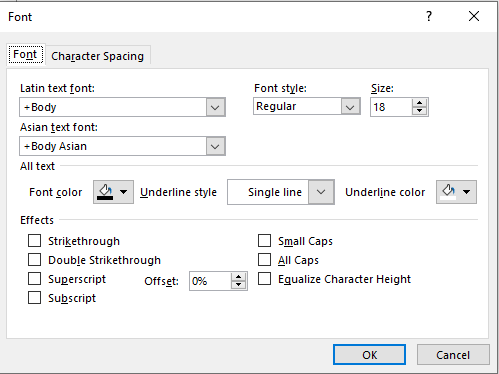
So the underline will be invisible.

I do understand this is still not an ideal solution to your requirement, so we would suggest you submitting your idea in the PowerPoint feedback function, so the product team can hear your voice and might bring out some changes in the future versions.
How do I give feedback on Microsoft Office?
Much appreciate for your understanding.
Regards,
Alex Chen
' cx='32' cy='32' r='32' /%3E%3Ctext x='50%25' y='55%25' dominant-baseline='middle' text-anchor='middle' fill='%23FFF' %3EA%3C/text%3E%3C/svg%3E)

' cx='32' cy='32' r='32' /%3E%3Ctext x='50%25' y='55%25' dominant-baseline='middle' text-anchor='middle' fill='%23FFF' %3ESR%3C/text%3E%3C/svg%3E)