Azure Logic Apps
An Azure service that automates the access and use of data across clouds without writing code.
This browser is no longer supported.
Upgrade to Microsoft Edge to take advantage of the latest features, security updates, and technical support.
' cx='32' cy='32' r='32' /%3E%3Ctext x='50%25' y='55%25' dominant-baseline='middle' text-anchor='middle' fill='%23FFF' %3ESA%3C/text%3E%3C/svg%3E)
Hi!
Im new to logic app and want to convert Excel file with multiple sheets to csv at once using logic app , Im able to convert perticular sheet(only 1 at a time) from excel file to csv but not all of them at once. Any help/suggestion would be appreciated
Thanks in advance

@S, Abeeya - Mindtree LTD If you are using Get Tables action then it returns all the tables in any of the worksheets. You can now loop in through the output of Get Tables action and use"list rows present in a table" action.
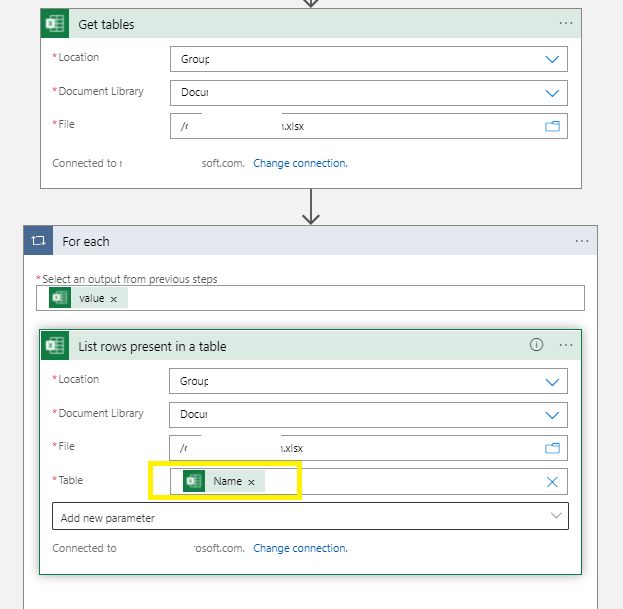
On the Table option Select Enter custom value and Select the dynamic content Name of your previous "Get Tables" action.
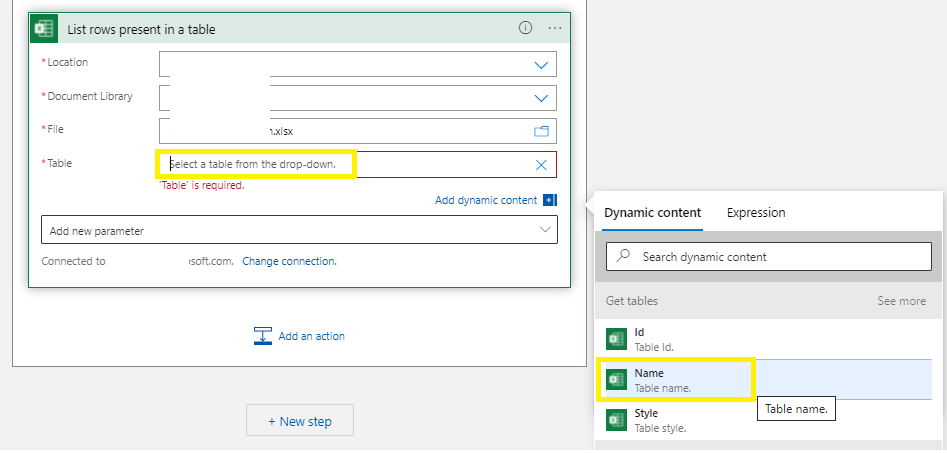
As you have already mentioned that you were able to convert one table to csv. The next actions should be inside the same for loop to save the table rows to csv.
' cx='32' cy='32' r='32' /%3E%3Ctext x='50%25' y='55%25' dominant-baseline='middle' text-anchor='middle' fill='%23FFF' %3ERT%3C/text%3E%3C/svg%3E)
Hi, thank you for the solution. I've tried your solution, but why my flow got skipped? I've make a thread for this, you can see my thread on https://stackoverflow.com/questions/78670251/get-tables-excel-online-business-logic-apps-value-returned-null
' cx='32' cy='32' r='32' /%3E%3Ctext x='50%25' y='55%25' dominant-baseline='middle' text-anchor='middle' fill='%23FFF' %3EZ%3C/text%3E%3C/svg%3E)
This is incorrect. This returns the tables in the default worksheet of the workbook. OP asked to retrieve list of sheets. This can be done using Get Worksheets