Share via

MS Project Tasks Misbehaving

Anonymous
2022-05-23T19:09:30+00:00

My tasks aren't observing non working hours.

I've tried setting up new calendars and nothing works. If a task ends today at 5 pm, and the next task starts tomorrow at 8am and is 2 hours long, MS is starting the task at 5, and by the next morning behaves as if the task was completed overnight.

Same with weekends. End at 5pm Friday? It thinks come 8 am Monday, all is complete.

To boot, I set up a new calendar. The default start time is 9am and end time is 4 pm. But when I look at the "Change Working Time" window it shows 8 to 5.

Microsoft 365 and Office | Project | For business | Windows

Locked Question. This question was migrated from the Microsoft Support Community. You can vote on whether it's helpful, but you can't add comments or replies or follow the question.

0 comments No comments

3 answers

Sort by: Most helpful
  1. John Project 49,715 Reputation points Volunteer Moderator
    2022-05-23T20:18:00+00:00

    Simpson21,

    Man what most people wouldn't give to see their tasks magically completed overnight or over a weekend. And you're complaining?

    Okay, let's start out with some things. You say you created a new calendar with work hours of 9 to 4. With no lunch break that's a 7 hour workday. Did you set the options (File > Options > Schedule tab > Hours per day) to reflect that?

    How exactly did you create your custom calendar?

    Did you set the Project calendar (Project > Properties group > Project Information) to be your new custom calendar?

    Is the Base Calendar for all your resources the same of your custom calendar?

    Do you have any separate task calendars?

    Did you set the start TIME to be 9:00 AM. By default it will be at 8:00 AM regardless of all other settings, so you must change it.
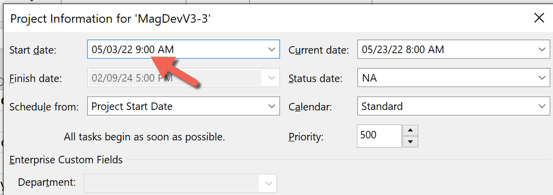
    You may also find it very useful to set your Date format option such that it includes the time of day along with the date.

    So, take a look at those items and if that doesn't get you going in the right direction, post some screen shots of your custom calendar and some sample tasks from your file.

    John

    Was this answer helpful?

    1 person found this answer helpful.
    0 comments No comments
  2. John Project 49,715 Reputation points Volunteer Moderator
    2022-06-02T16:50:16+00:00

    Simpson2121,

    When you changed the Project Start Time, it will update a linked sequence of tasks (i.e. move everything back an hour) which is what I see in your screen shot. So I don't understand your first statement about updating mornings but not afternoons.

    You say you have no task calendars yet every task in the screen shot shows an Indicators icon that says there is a task calendar. So what do you have set as the task calendar(s)?

    Your last paragraph talks about a "session" (?) on Saturday morning and the Tech task moving to Monday. The screen shot doesn't support that. The only tasks I see as questionable are task IDs 12 through 17 which do show as active during what would normally be non-working time, so something is obviously haywire in how the calendars (Project, task and/or resource) are structured, but without further detail I can't tell what that is.

    Project does NOT do random scheduling. Would you be willing to send me your file? I can pretty much guarantee that in 5 minutes I'll find out what's wrong. My contact info is below. I will ask some questions.

    John

    jmacprojataticlouddotdotcom

    (remove obvious redundancies)

    Was this answer helpful?

    0 comments No comments
  3. Anonymous
    2022-06-02T15:24:44+00:00

    Hello John,

    So no, I hadn't changed the start date time. When I did so, it updated mornings, but not afternoons. (LOVE having to change the same information in multiple places)

    Because this project is for work, I then went and changed all of the resource names to protect the innocent and it updated all of the afternoon times, but then scheduled the work right through the weekend, which is great. (See attached).

    My company has turned off the ability to screenshot, so all I can say is;

    • "Did you set the Project calendar (Project > Properties group > Project Information) to be your new custom calendar?" Yes.
    • **"**Is the Base Calendar for all your resources the same of your custom calendar?" Yes. And I double checked.
    • **"**Do you have any separate task calendars?" No.
    • "Did you set the start TIME to be 9:00 AM. By default it will be at 8:00 AM regardless of all other settings, so you must change it." It is now.
    • **"**You may also find it very useful to set your Date format option such that it includes the time of day along with the date." As you can see, that is how I set it up.

    I'm also finding that making an edit to just about anything has the unintended consequence of doing completely weird and unanticipated things to the schedule. For example; I added in another PM on line 32, moving the tech down a row (and updated my dependencies). It then scheduled that session for Saturday morning at 10am, and bumped the Tech session to Monday at 9.

    Scheduling iscompletely unstable and unpredictable.

    Was this answer helpful?

    0 comments No comments