Share via

Office documents - cannot delete pinned items

Anonymous
2022-10-06T17:17:01+00:00

Hello - Recently many of my documents were moved from a location on my laptop (C: drive) to One-drive. The documents were pinned into multiple Office products like Excel, PowerPoint, etc. The documents are no longer available in the old location after the move and because of that, I cannot un-pin the docs from the Office products. I want to pin docs from the new location but unable to remove the old ones.

Microsoft 365 and Office | PowerPoint | For business | Windows

Locked Question. This question was migrated from the Microsoft Support Community. You can vote on whether it's helpful, but you can't add comments or replies or follow the question.

0 comments No comments

10 answers

Sort by: Most helpful
  1. Anonymous
    2022-10-07T10:59:06+00:00

    Hello -

    I have version 2208.

    I cannot perform an online repair.

    If we can have a session, I can show the issue and you can help troubleshoot.

    Thanks for your help.

    Was this answer helpful?

    0 comments No comments
  2. Anonymous
    2022-10-07T07:20:45+00:00

    Hi Dilip,

    Thanks for posting back to this Forum. We are happy to continue troubleshooting with you.

    I tested from my Office environments.

    • Created PowerPoint, Word and Excel files
    • Saved them to Local Disk C.
    • Pinned these documents from respective apps.
    • Moved these Documents from C to OneDrive folder on the Local Computer.
    • Opened these specific Apps.
    • Tried to unpin and for sure, I can unpin these documents without any issues.
    1. Now, For testing purposes, could you please just create one file, save it to C, pin, move it to a different folder and try to unpin it to see if the same behavior occurs.
    2. Meanwhile, please make sure you have the latest Office version. The latest version of Microsoft 365 Apps for Enterprise Current Channel is version 2209 Build 15629.20156 released on September 26, 2022: Update history for Microsoft 365 Apps (listed by date) - Office release notes | Microsoft Learn.
    3. Also, I suggest you try to do Office Online repair to see if this can fix the issue: Repair an Office application (microsoft.com). to see if it can help us.
    4. From the first reply, Neha asked you to provide the Office version information, Yes you mentioned you are using Microsoft 365 Apps for Enterprise. But We need to test in the same environment, considering the channel and version number. So could you please share with us the screenshot of your account page? File > Account:

    Thank you for your cooperation. Looking forward to your reply. Stay safe and healthy!

    Sincerely,

    Edwine | Microsoft Community Moderator

    Was this answer helpful?

    0 comments No comments
  3. Anonymous
    2022-10-07T01:05:48+00:00

    Hello -

    I have tried to un-pin from the pinned list of docs but nothing happens. I cannot do it from the file itself, as the file is not in the original location (it was moved to Onedrive).

    Product info: Microsoft 365 Apps for Enterprise

    This happens to the Office apps I use like Excel and PowerPoint.

    Thanks

    Was this answer helpful?

    0 comments No comments
  4. Anonymous
    2022-10-07T00:52:11+00:00

    Dear Dilip H,

    Greetings! Thank you for posting in the Microsoft forum.

    May I know if right clicking the file and selecting Unpin from list did any trick? If you’ve tried this, then try clicking the pin button again to unpin the file.
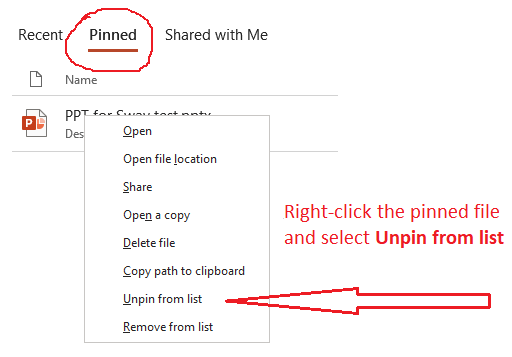
    If it still didn’t work, please provide us with the following information, so we can find the related information:

    1. Please provide the screenshot of Microsoft 365 Product Information. To get this screenshot, open OneNote on your system, click File>Account, capture the screenshot of all the information mentioned under Product Information.
    2. Does this happen only in PowerPoint app?

    We will look forward to your reply. Stay safe and stay healthy.

    Sincerely,

    Neha Singh | Microsoft Community Moderator

    Was this answer helpful?

    0 comments No comments
  5. Deleted

    This answer has been deleted due to a violation of our Code of Conduct. The answer was manually reported or identified through automated detection before action was taken. Please refer to our Code of Conduct for more information.


    Comments have been turned off. Learn more