Share via

PowerPoint Recording feature - lost functionality

Anonymous
2022-09-15T19:19:33+00:00

I'm recording voice-over on PowerPoint using the [record] option. When prototyped 2 months ago, I could record each page separately. If need be, I could replace a narration on a specific page and all was well. Now, while the individual page recording is an option, it no longer collects the audio--meaning that the whole presentation needs to be recorded flawlessly together to be able to produce an mp4 file. Is there a workaround for this? I've tried clearing audio on the page, then continuing, and end up with some pages with recorded audio, and others without.

Microsoft 365 and Office | PowerPoint | For business | Windows

Locked Question. This question was migrated from the Microsoft Support Community. You can vote on whether it's helpful, but you can't add comments or replies or follow the question.

0 comments No comments

Answer accepted by question author

Anonymous
2022-10-05T15:10:43+00:00

Greetings --

I've figured out a process that works. Record the whole presentation (errors and all) then save and close. Then go back on each page that needs to be re-recorded, clear the page recording, record, close edit, save, and close ppt. Reopen and go to the next page and repeat. If there is a page where recording doesn't appear to stick, I have to reboot. Unfortunately, I don't have IT support on office products, and don't want to lose precious time trying to reload or fix powerpoint. Clunky, but functional.

Was this answer helpful?

0 comments No comments

7 additional answers

Sort by: Most helpful
  1. Anonymous
    2022-09-20T15:25:27+00:00

    My recordings are voice over narration. No added audio/music/special effects sound files.

    Was this answer helpful?

    0 comments No comments
  2. Anonymous
    2022-09-20T10:36:04+00:00

    Dear Paula Whipple,

    Thank you for posting back and sharing these detailed information with us.

    For "When I export to mp4, the not all audio page audio gets recorded into the mp4. If I click to clear all recordings, record each page individually, then export to mp4, I get no audio on any page."

    For the audio you mentioned, we'd like to confirm is it narration or an audio file you inserted into slide?

    At the same time, please allow us some time to do tests from our side, we will post back as soon as we get any update.

    Thanks for your patience and understanding!

    Hope you have a nice day.

    Sincerely,

    Tina | Microsoft Community Moderator

    Was this answer helpful?

    0 comments No comments
  3. Anonymous
    2022-09-19T23:27:25+00:00

    Hi Tina,

    Thanks so much for responding!

    my version:

    It appears problematic on all of the 20 or so ppts I've developed for our product training.

    Here's what I do:

    1. I use the record button to open the "recorder"

    1. to fully start over I click here and select all pages

    Image

    1. My preferred recording method is to record each page separately (way less stressful :-) )

    Image

    If I need to redo the page, I click retake video and record again.

    Image

    When I export to mp4, the not all audio page audio gets recorded into the mp4.

    If I click to clear all recordings, record each page individually, then export to mp4, I get no audio on any page.

    Was this answer helpful?

    0 comments No comments
  4. Anonymous
    2022-09-16T05:07:40+00:00

    Dear Paula Whipple,

    Good day! Thank you for posting in Microsoft Community.

    From description, when you record each page separately you cannot replace a narration on a specific page.

    May I know if my understanding of the scenario is consistent with yours?

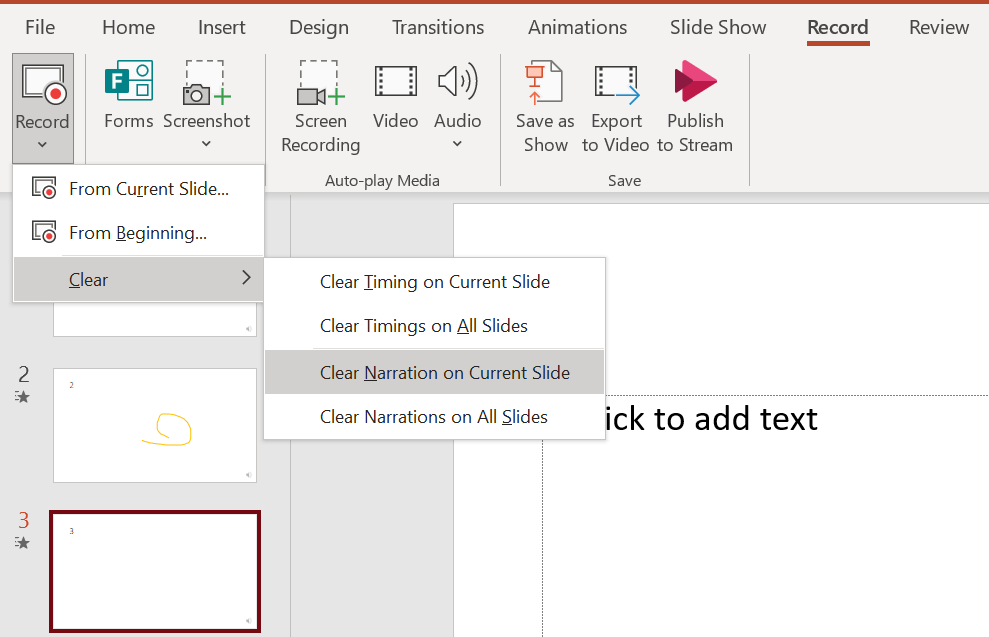
    If yes, I tried to test in PowerPoint from our side. I can replace a narration on a specific slide with steps below:

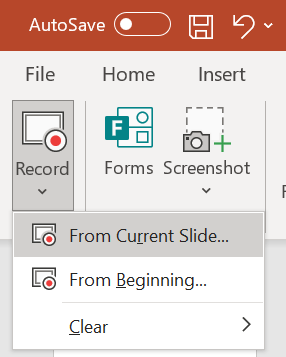
    Select the slide, click Record tab > click Record > Clear > choose "Clear Narration on Current Slide".  Then click Record again, chose "From Current Slide", record a new narration for the slide.

    Then I exported the presentation to MP4 file, the narration worked on each slide.
    Image

    Image

    I'd like to help you, we can work together and try to narrow down and resolve the situation.

    Before moving forward, could you confirm information below? It would be very helpful for the troubleshooting.

    1.How did you replace narration on separate slide and record narration again? Could you share your detailed steps?

    2.Does the issue happen in a specific PowerPoint presentation? If you create a new presentation, does it work?

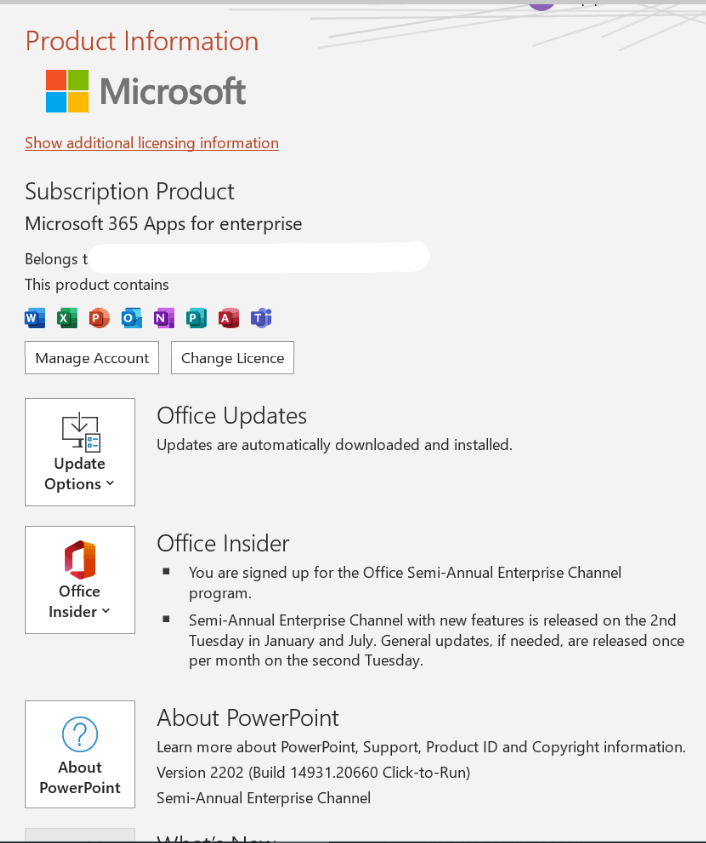
    3.What is the version of your PowerPoint app? We'd like to test in same version and see if we can reproduce the issue. Please go to File>Account, capture a screenshot of Product Information, as shown below.
    Image

    Look forward to your reply. Thanks for your cooperation!

    Hope you keep safe and healthy always.

    Sincerely,

    Tina | Microsoft Community Moderator

    Was this answer helpful?

    0 comments No comments