Developer technologies | Transact-SQL
A Microsoft extension to the ANSI SQL language that includes procedural programming, local variables, and various support functions.
This browser is no longer supported.
Upgrade to Microsoft Edge to take advantage of the latest features, security updates, and technical support.
' cx='32' cy='32' r='32' /%3E%3Ctext x='50%25' y='55%25' dominant-baseline='middle' text-anchor='middle' fill='%23FFF' %3EWL%3C/text%3E%3C/svg%3E)
Hello Support,
I am using a Sql Server2019 (SQL Server 15.0.2080.9). Under Maintenance Plans, i created a task which should clean up und delete files older than three days. If i execute the task it says succes but nothing happened. No file withe the extension trn or bak is deleted in the directory.
What is the failure?
What can I do to solve this Problem,because up to now i have delete manually 1 time a week ohtherwise i get into problems withe the the disk space.
Greetings Wolfgang

I am using a Sql Server2019 (SQL Server 15.0.2080.9).
That's a quite early build of SQL 2019. Although it is unlikely to affect your problem, I recommend that you download and install Cumulative Update 12, which is the most recent CU for SQL 2019.

Hi @Wolfgang Lehr ,
Did the reply(s) could help you? If the response helped, do "Accept Answer". If it is not work, please let us know the progress. By doing so, it will benefit all community members who are having this similar issue. Your contribution is highly appreciated.
' cx='32' cy='32' r='32' /%3E%3Ctext x='50%25' y='55%25' dominant-baseline='middle' text-anchor='middle' fill='%23FFF' %3ETP%3C/text%3E%3C/svg%3E)
The backup cleanup task does not delete based on the files, it deletes based on the backup log. If the log does not exist for the backup file, it does not delete it. If you moved the files from another location, it will never delete them.
What happens if you run:
EXECUTE master.dbo.xp_delete_file 0,N'{yourdirectory}',N'bak',N'{3daysago}'
' cx='32' cy='32' r='32' /%3E%3Ctext x='50%25' y='55%25' dominant-baseline='middle' text-anchor='middle' fill='%23FFF' %3EKK%3C/text%3E%3C/svg%3E)
hi @Tom Phillips - I'm looking for a query to show the contents of the "backup log". I'm unable to delete TRN files and think your comment may be relevant to what's happening in my situation. Thank you.
Also, I haven't been on MSDN in a LLLLLLLOOOOOOONNNNGGGG time and I couldn't find a way to send a message to you without posting and wasn't sure posting in this manner was appropriate etiquette for the site.
Hello,
I do it as Maintenance Cleanup.
EXECUTE master.dbo.xp_delete_file 0,N'D:\SQL Sicherung',N'bak',N'2021-08-13T23:29:57'
sorry forget one sign!
EXECUTE master.dbo.xp_delete_file 0,N'D:\SQL Sicherung',N'bak',N'2021-08-13T23:31:31',1
Hi @Wolfgang Lehr ,
Please check below to resolve the issue;
1.Use . for the file extension or bak without a dot, both of which I have found work if other issues are correct too.
2.Make sure that the path is simply the path to where your backups are but with a backslash on the end.
3.Please make sure the file location is correct.
4.Did your agent service account has the modify permission for the files.
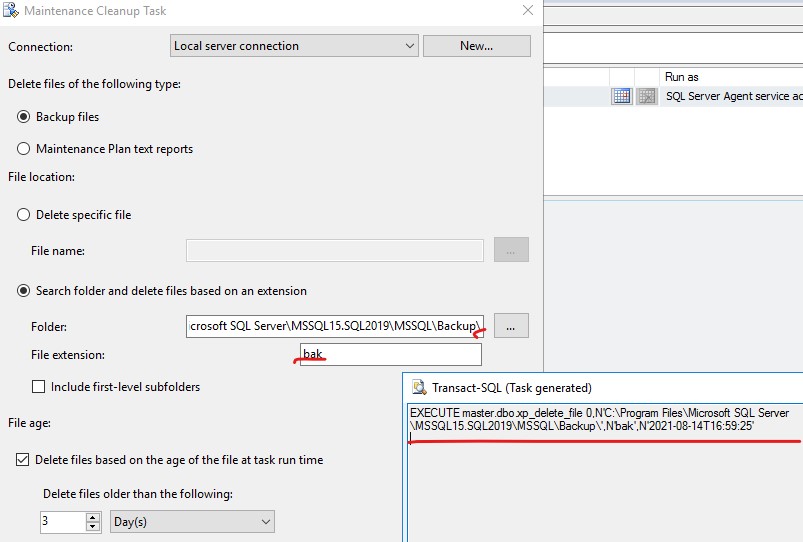
If it is not work, check other solutions from the similar thread SQL Maintenance Cleanup Task Working but Not Deleting.
If the response is helpful, please click "Accept Answer" and upvote it, as this could help other community members looking for similar thread.
such easy thinks where checked at the bieginning.
This doesn´t solve the problem!
Hi @Wolfgang Lehr ,
Add a backslash on the end of your backup file location. From the above scripts that you offered, you did not add this. I test this in my environment. If I do not add a backslash on the end of the file location, I met the same issue as you. It works well after I add a backslash on the end.
EXECUTE master.dbo.xp_delete_file 0,N'D:\SQL_Sicherung\',N'bak',N'2021-08-16T09:09:26'
still desame proplem, task says success but nothing is deleted!
Hi @Wolfgang Lehr ,
It is so strange. Could you share us the screenshots from your Maintenance Cleanup Task Wizard to make us better understood your environment?
The Basic settings are checked first. Nothing worked until now!