Linked chart in PowerPoint to Excel doesn't update after closing and opening

Anonymous
2022-12-15T13:02:30+00:00

I have an Excel file with chart and a PowerPoint file where I have copied the charts with linked data. These are stored on SharePoint. When I first link them, changing the data in the Excel file updates the chart in the PowerPoint. But when I close them and re-open the files and try again, it doesn't update.

When I click on edit data, it opens the correct file and chart, so it is apparently still linked. The automatic update checkbox gets unchecked after closing and opening (and also after saving after checking the checkbox).

What could be the issue?

If using Microsofts wonderful ability to link to files and stay updated and using your versatile collaborative Sharepoint solution, doesn't this needs to work smoothly?

Microsoft 365 and Office | PowerPoint | For business | Windows

Locked Question. This question was migrated from the Microsoft Support Community. You can vote on whether it's helpful, but you can't add comments or replies or follow the question.

0 comments No comments
{count} votes
Answer accepted by question author
  1. Anonymous
    2022-12-16T10:23:35+00:00

    Dear SdeHond,

    Thank you for posting back. We appreciate your precious time doing tests.

    Very glad to know the steps shared above can help you make the links update seamlessly. Thank you for sharing. 😊

    And I recommend you send feedback for the Paste Special feature, you may go to File>Feedback within PowerPoint to provide feedback, this is the best way to let PowerPoint developers know your requirement and help us improve the product.

    At the same time, if you find our reply helpful, you may use the feedback tool under our replies (as shown below) to provide your valuable feedback, which will also help other community members who have similar questions.

    Image

    Welcome to post new threads when you have other questions, we are always here to assist you.

    Hope you have a nice day, stay safe and healthy always!

    Sincerely,

    Tina | Microsoft Community Moderator

    2 people found this answer helpful.
    0 comments No comments
Answer accepted by question author
  1. Anonymous
    2022-12-15T16:16:43+00:00

    Dear SdeHond,

    Greetings! Thank you for posting in Microsoft Community.

    As per your description, you have an Excel file with chart and a PowerPoint file where I have copied the charts with linked data. When you close and reopen files, the data doesn't update.

    We'd like to help you, please let us cooperate and please don't worry, we can work together to narrow down and resolve the situation.

    May I know how did you link chart from Excel to PowerPoint file?

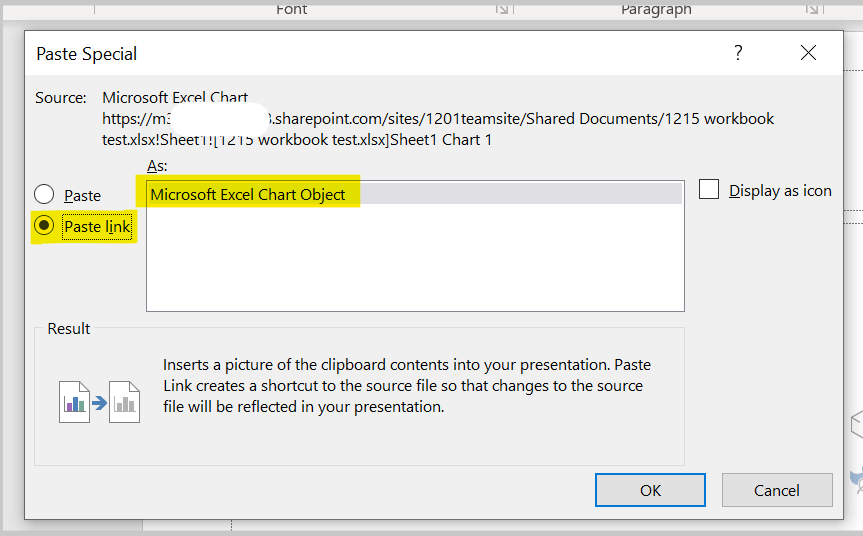
    When we test from our side, we copy the chart from Excel file, then open a PowerPoint file, from Home tab, click Paste > Paste Special > Paste Link > Microsoft Excel Chart Object > OK. Changing the data from Excel file updates the chart in the PowerPoint. We save both files to SharePoint Online and close them.
    Then we reopen the Excel file and PowerPoint file from recent files, in PowerPoint it shows a notification, as shown below.
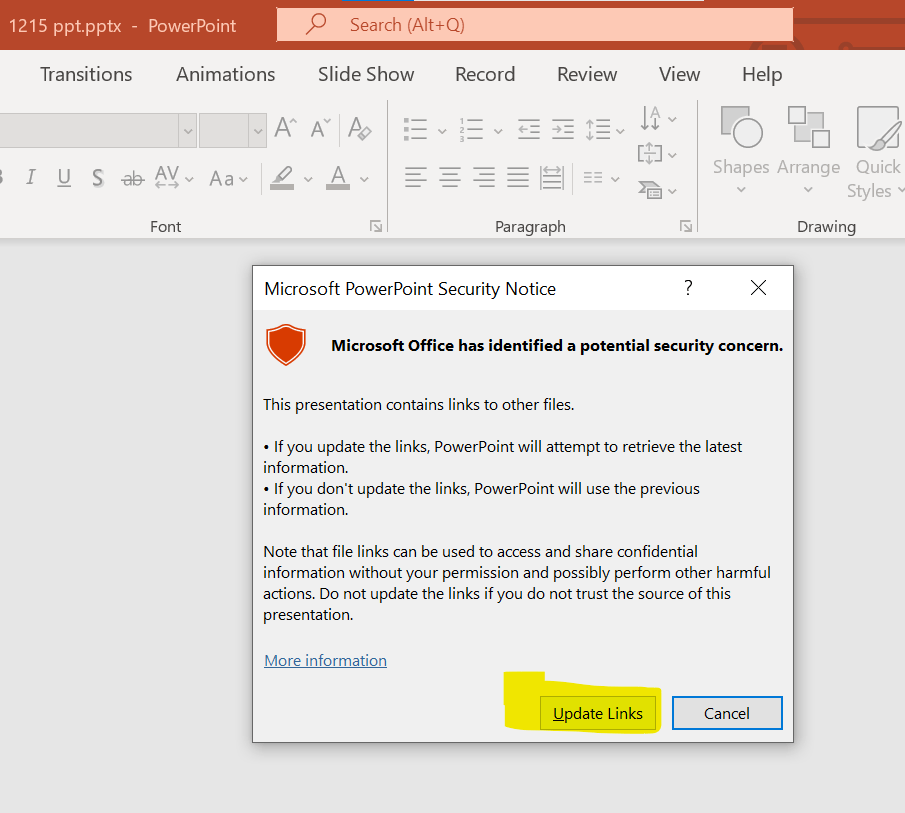
    We click Update Links. And we make change to data in Excel file, it still updates to the chart in PowerPoint.

    In the PowerPoint file, we go to File > Info > Edit Links to Files > the Automatic Update checkbox is checked.
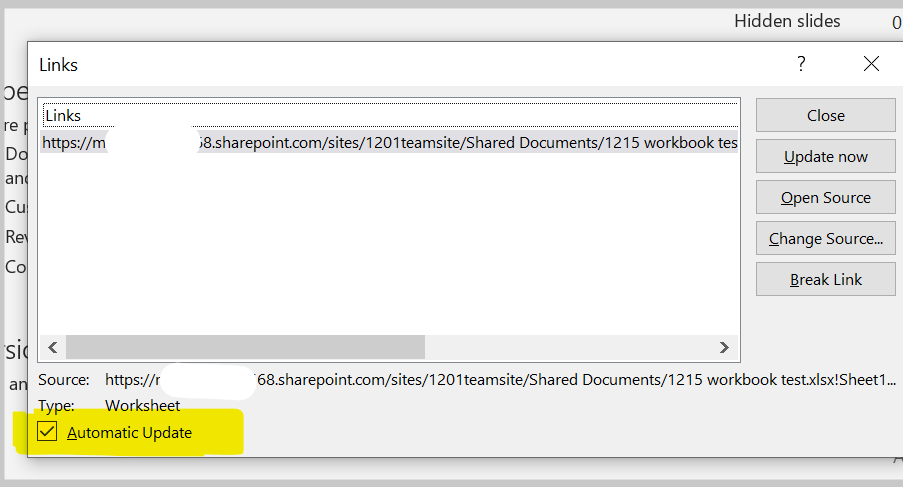
    If the steps above are not consistent with yours, feel free to point it out. And could you share with us your detailed steps?

    At the same time, we'd like to know the version of your PowerPoint, we want to test in same version and check if we can reproduce same situation.

    Please go to File>Account, capture a screenshot of Product Information, as shown below.

    Thanks for your cooperation! Look forward to your reply. I hope you keep safe and healthy always.

    Sincerely,

    Tina | Microsoft Community Moderator

    1 person found this answer helpful.
    0 comments No comments

1 additional answer

Sort by: Most helpful
  1. Anonymous
    2022-12-16T10:05:05+00:00

    Hi :-)

    Your steps worked for me. I had chosen "pasting with linked data", the little icon above Paste special.

    So pasting this way does make the links update seamlessly, but you miss out on being able to edit the font size in the chart in powerpoint. We can live without that feature.

    I couldn't find this explanation about paste special anywhere when I was searching for information. This might be an indication of that the process isn't self explanatory to the user.

    Thank you a lot.

    1 person found this answer helpful.
    0 comments No comments