Hi Edwine,
Thanks for getting back to me. After reading your comment I thought the issue might have been that what you mentioned, that I was adding data outside of the 'range' of my initially selected data group.
To resolve this, I turned all of the data ranges in my Excel workbook to be Tables which the graphs in Excel are now created from. This way, anytime I increase the range of my Table by adding a new month, the graph expands as well in Excel.
However, after doing this and linking the graphs to Powerpoint by the method you outlined, I am still not seeing any changes when adding the additional columns. The issue again is isolated to new series, as if I change a data point for an existing series it updates automatically in Powerpoint immediately.
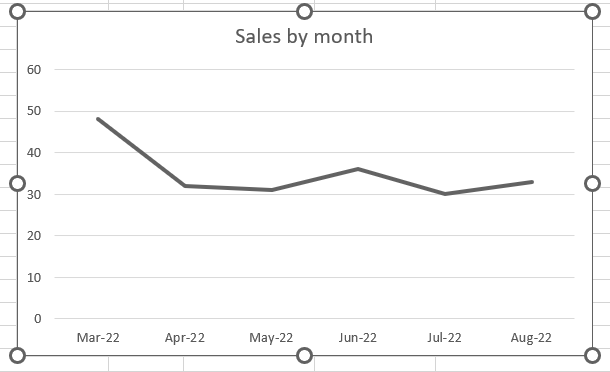
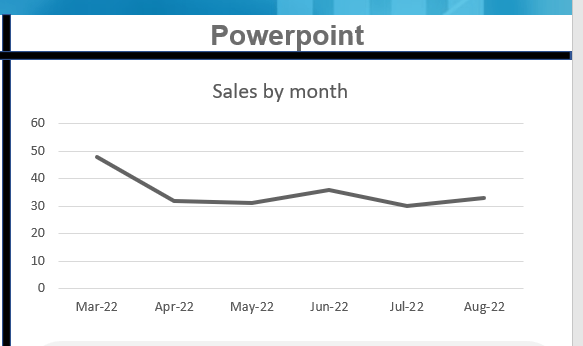 \
\
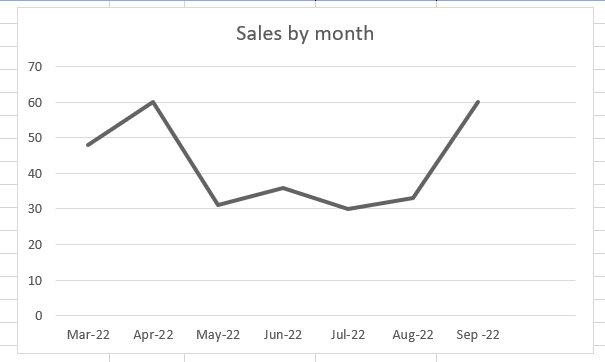
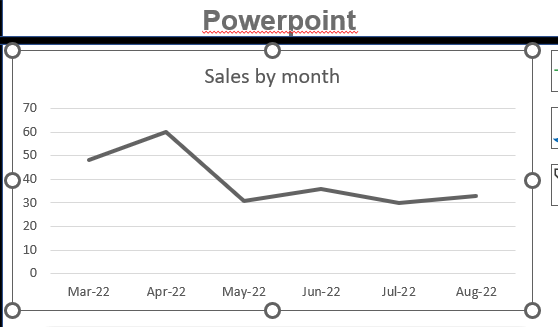
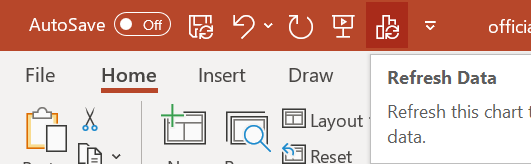
In these images I've shown how the graphs can initially look exactly the same. But then after updating the data for April and adding September in Excel, only the April adjustment shows up in Powerpoint. This is even after clicking the 'Refresh Data' button I added at the very top of my powerpoint to try and resolve this.
I've tried pasting as you outlined, CTRL V then selecting CTRL in the bottom right and choosing one of the two linked options. I've also tried right-clicking and pasting via one of those methods directly. Neither are working.
My Powerpoint version is Microsoft® PowerPoint® for Microsoft 365 MSO (Version 2208 Build 16.0)
Thank you!
' cx='32' cy='32' r='32' /%3E%3Ctext x='50%25' y='55%25' dominant-baseline='middle' text-anchor='middle' fill='%23FFF' %3EA%3C/text%3E%3C/svg%3E)
