Hi PhoebeD'Orsai,
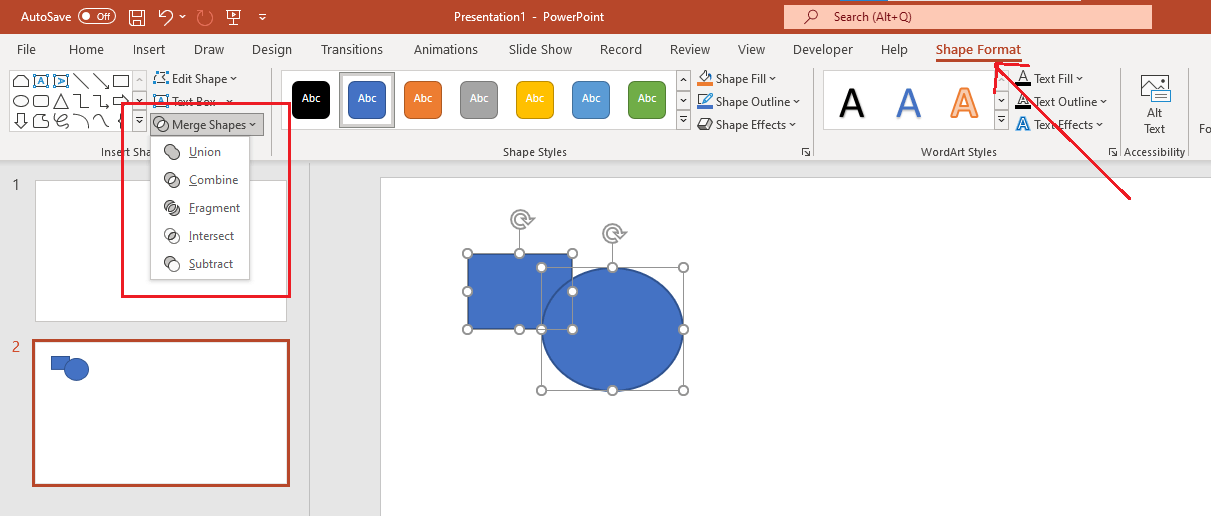
May I know if you see Merge Shape under Shape Format tab, as show below?

- To access the Merge Shape commands in PowerPoint, you first need to insert some shapes on your PowerPoint slide. In this example, I inserted a Rectangle and a Circle.
- When I selected a shape, a new tab called Shape format appear.
- Within the Shape format tab, locate the Insert Shapes group and click the Merge Shapes button. This brings up the Merge Shapes drop-down gallery.
As you mentioned “PowerPoint does not have the "merge shape" button at all”, I am assuming the mentioned button does not appear when you select multiple shapes, right?
Let’s try repairing Office apps from Control Panel, see if this makes any difference:
- Click the Start button > Control Panel. From Category view, under Programs, select Uninstall a program.
- Click Microsoft 365 in the list of products, and then click Change and select Online Repair.
Please try Online repair. Quick repair only detects and then replaces corrupted files, and an Online repair option will do a complete repair; it will take a few extra minutes to repair Office applications.
I understand sometimes the initial suggestion may not resolve the problem; however, we can work together to narrow down and resolve the situation. If you still need help, please provide us with the following information:
- Please provide us with the screenshot of Microsoft 365 Product Information. To get this screenshot, open Word or Excel on your system, click File>Account, capture the screenshot of all the information mentioned under Product Information.
- May I know if you had this button before?
- Please provide us with the screenshot of Shape format tab so I can understand what all buttona are visible.
Thanks,
Neha
' cx='32' cy='32' r='32' /%3E%3Ctext x='50%25' y='55%25' dominant-baseline='middle' text-anchor='middle' fill='%23FFF' %3EA%3C/text%3E%3C/svg%3E)
