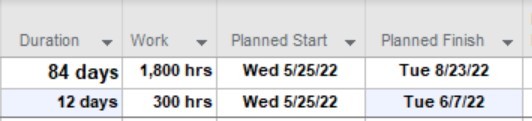
When I set a fixed duration task to start on 5/25 and finish on 6/7, this is a duration of 10 days. MS Project for some reason however, is displaying a duration of 12 days. This is incorrect. I don't' understand why its doing this. If I manually change the duration field to 10 days, then project changes the finish date to 6/6, which is still not correct because working days from 5/25 to 6/6 would be 8 days. I have May 30th scheduled as a non-working day for memorial day. I'm not sure if it has anything to do with the options I have set for the project which is 6 hours per day, 30 hours per week to account for the reality that its not realistic for someone to be able to dedicate a full 8 hour day to project work. See screenshot.
' cx='32' cy='32' r='32' /%3E%3Ctext x='50%25' y='55%25' dominant-baseline='middle' text-anchor='middle' fill='%23FFF' %3EA%3C/text%3E%3C/svg%3E)

' cx='32' cy='32' r='32' /%3E%3Ctext x='50%25' y='55%25' dominant-baseline='middle' text-anchor='middle' fill='%23FFF' %3EJP%3C/text%3E%3C/svg%3E)