Dear Jiri Friml,
Greetings! Thank you for posting in Microsoft Community.
As per your description, please let us cooperate and please don't worry, we can work together to narrow down and resolve the situation.
May I know if you have 2 presentations, A and B, you have some notes and different information in the second presentation B?
And may I know if you want to show presentation A to audience, and show presentation B only to the presenter, they both would go to next slide after clicking?
If yes, did you try using Presenter View on presentation B?
You may need to add the different information to Notes so that they won't display to audience.
Generally by using PowerPoint Presenter View, it can show speaker notes to presenter only, and the slides themselves appear on the screen that your audience sees.
You can turn on Presenter View from Slide Show tab > click the checkbox for "Use Presenter View". Reference: Start the presentation and see your notes in Presenter view - Microsoft Support
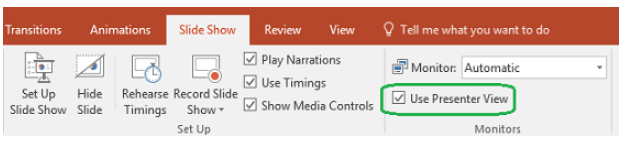
If our understanding of the scenario is not consistent with yours, feel free to point it out. We will continue assisting you.
You may share some screenshots to show the differences between the 2 presentations so we can better understand the scenario and share suggestions.
I hope you keep safe and healthy always!
Sincerely,
Tina | Microsoft Community Moderator
' cx='32' cy='32' r='32' /%3E%3Ctext x='50%25' y='55%25' dominant-baseline='middle' text-anchor='middle' fill='%23FFF' %3EA%3C/text%3E%3C/svg%3E)
