SQL Server Integration Services
A Microsoft platform for building enterprise-level data integration and data transformations solutions.
This browser is no longer supported.
Upgrade to Microsoft Edge to take advantage of the latest features, security updates, and technical support.
' cx='32' cy='32' r='32' /%3E%3Ctext x='50%25' y='55%25' dominant-baseline='middle' text-anchor='middle' fill='%23FFF' %3EBN%3C/text%3E%3C/svg%3E)
Hi Team,
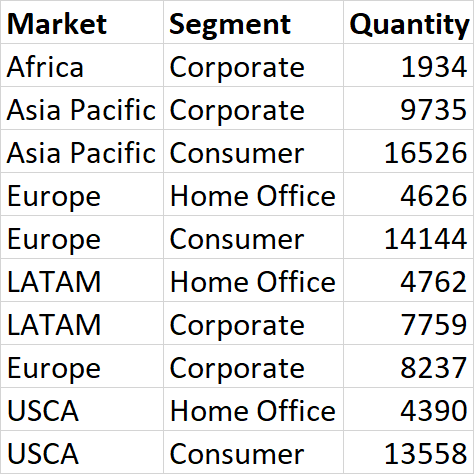
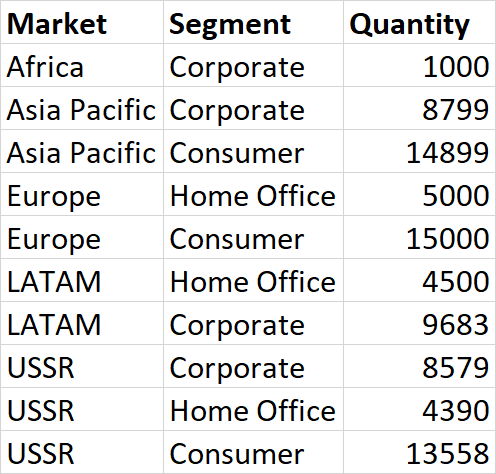
Have two tables like bellow.
TableA:
TableB:
I need output like bellow
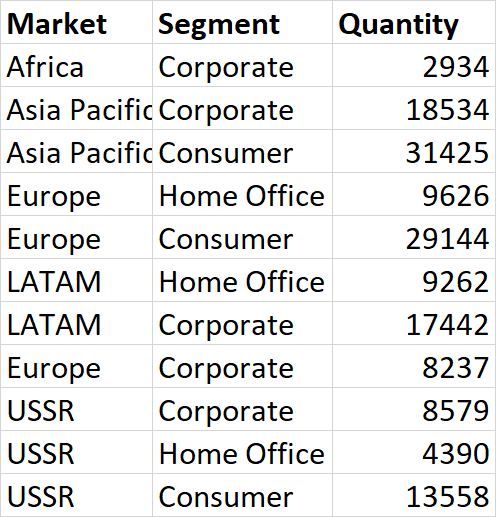
Please help on same to achieve this.
' cx='32' cy='32' r='32' /%3E%3Ctext x='50%25' y='55%25' dominant-baseline='middle' text-anchor='middle' fill='%23FFF' %3EYK%3C/text%3E%3C/svg%3E)
While asking a question, you need to provide a minimal reproducible example:
(1) DDL and sample data population, i.e. CREATE table(s) plus INSERT T-SQL statements.
(2) What you need to do, i.e. logic and your code attempt implementation of it in T-SQL.
(3) Desired output, based on the sample data in #1 above.
(4) Your SQL Server version (SELECT @@version;).
All within the question, no images.
It is an SQL question. So you can use SSIS Execute SQL Task.
SQL
-- DDL and sample data population, start
DECLARE @tbl1 TABLE (ID INT IDENTITY PRIMARY KEY, market VARCHAR(30), segment VARCHAR(30), quantity INT);
INSERT INTO @tbl1 (market, segment, quantity) VALUES
('Africa', 'Corporate', 1934),
('Europe', 'Home Office', 4626),
('Europe', 'Consumer', 14144);

DECLARE @tbl2 TABLE (ID INT IDENTITY PRIMARY KEY, market VARCHAR(30), segment VARCHAR(30), quantity INT);
INSERT INTO @tbl2 (market, segment, quantity) VALUES
('Africa', 'Corporate', 1000),
('Europe', 'Home Office', 5000),
('Europe', 'Consumer', 15000);
-- DDL and sample data population, end

;WITH rs AS
(
 SELECT market, segment, quantity FROM @tbl1
 UNION ALL
 SELECT market, segment, quantity FROM @tbl2
)
SELECT market, segment, SUM(quantity) AS quantity
FROM rs
GROUP BY market, segment
ORDER BY rs.market, rs.segment;
Output
+--------+-------------+----------+
| market |   segment   | quantity |
+--------+-------------+----------+
| Africa | Corporate   |     2934 |
| Europe | Consumer    |    29144 |
| Europe | Home Office |     9626 |
+--------+-------------+----------+
--- Update ---
If your tables are located on different servers, your SSIS Data flow needs the following:
Hi YitzhakKhabinsky-0887 ,
Thanks for quick support.
Have one more small doubt.
it will work If two tables on same sever
How to achieve same if one table in cloud and another table in on premise
I updated the answer.
Please check its UPDATE section.

I think @Yitzhak Khabinsky has given a perfect and detailed answer to resolve the issue.
You could mark it as answer so other user with similar problem could see this easier. :)
Regards,
Zoe
If the answer is helpful, please click "Accept Answer" and upvote it.
Note: Please follow the steps in our documentation to enable e-mail notifications if you want to receive the related email notification for this thread.
Hot issues October