Dear Nina Fong,
Good day! Thank you for posting to Microsoft Community. We are happy to help you.
As per your description, please don’t worry, we can work together to narrow down and resolve the situation.
It seems you are unable to open your PowerPoint presentation in PowerPoint desktop client app via SharePoint online document library.
I just tested from my side, when I open PowerPoint file from SharePoint online document library via click on "Open in app" and it's opened without any issue.
May I know does issue happened do specific PowerPoint document file? If the issue only happens to a specific file, and in this scenario, please copy/paste content to a new created PowerPoint file, then to check the outcomes.
Could you please try another way to open your PowerPoint file from SharePoint online.
1.Download your problematic PowerPoint file into local machine/device via select the file and click on "Download" from SharePoint online document library and then try to open in PowerPoint desktop client app to check the outcomes.
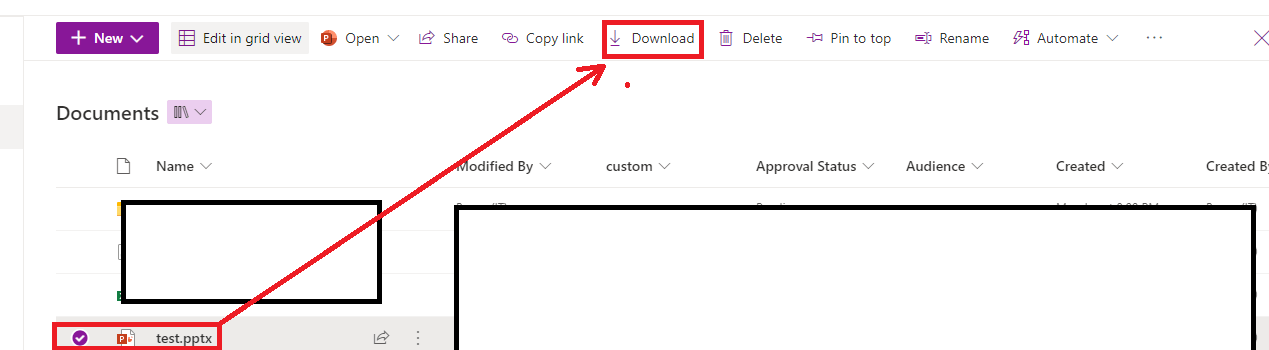
2.Please try to sync your SharePoint online document library on your machine and then go to sync folder and click on problematic PowerPoint file and verify the result with us.
If the issue still persists, could you please provide some information for us to better understand.
- Please capture a screenshot of error message and share with us.
2.Please provide us the PowerPoint version information and confirm your "OS" e.g. are you using Windows or Mac "OS".
3.Does the issue happens on all PowerPoint files or a specific one?
- Confirm whether other applications files also get the same problem? Such as Word or Excel and etc.
Your understanding and patience will be highly appreciated. I hope that you are keeping safe and well!
Sincerely,
Waqas Muhammad
***Note: In the event that you're unable to reply to this thread, please ensure that your Email address is verified in the Community Website by clicking on Your Account Name > "My Profile" > "Edit Profile" > Add your Email Address > tick "Receive email notifications" checkbox > click on "Save".***
' cx='32' cy='32' r='32' /%3E%3Ctext x='50%25' y='55%25' dominant-baseline='middle' text-anchor='middle' fill='%23FFF' %3EA%3C/text%3E%3C/svg%3E)
