Dear Patrick_3434,
Good day! Thank you for posting to Microsoft Community.
We are so much willing to help you. Please let us work together.
Based on your description, it seems you have a School account but whenever you try to access Microsoft Project, It says that you don’t have license. Sorry for the inconvenience caused by this issue and we apologize for it!
For this situation you encountered, we want to confirm with you if you just have Project for Office license, as shown below in your Subscriptions Page:
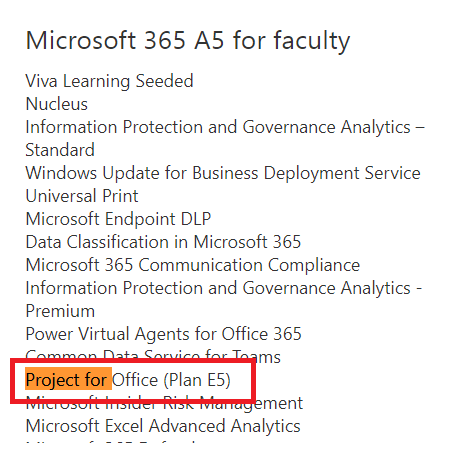
If you just have such license under your subscriptions page, kindly understand that this kind of Project for Office license is for "View" purposes only. You cannot create or edit any Projects or roadmaps without a proper plan license. Users with Project for Office license like the one in the screenshot above have read-only access to projects and roadmaps that are shared with them. If you want to access Microsoft Project to be able to create projects, edit etc, you need a Project license such as Project plan1, Project plan3, and Project Plan5.
If you don’t see something like Project plan1, Project plan3, and Project Plan5 under your subscriptions page via this link: Subscription, you need to contact school IT administrator to help you assign that Project License.
Do you know who your school admin is? if not, please check this article to help you find your Admin: Find the administrator for your work or school account (microsoft.com).
If the scenario above is inconsistent with yours, could you provide the screenshot of Project plan for web?
To better understand your situation and narrow down the issue, could you please provide the information below:
- Provide the screenshot of your license? You can go to Subscription page and provide screenshot of your License.
- Take a screenshot of the error message you get when you try to access Project.
Thanks for your kind understanding and cooperation. I hope the above helps! Good luck and stay safe!
With Sincerest Regards,
Edwine | Microsoft Community Moderator
' cx='32' cy='32' r='32' /%3E%3Ctext x='50%25' y='55%25' dominant-baseline='middle' text-anchor='middle' fill='%23FFF' %3EA%3C/text%3E%3C/svg%3E)
