Dear Michaela Babjakova,
Good day.
Thank you for posting in Microsoft Community.
According to your description, when you update the linked tabled/charts in a presentation by right clicking the table>choose Update link, the table disappears and it looks like the linked source file shows up.
We understand it affects your work. Sorry for the inconvenience caused.
We did a test from our side with steps below. It is also the way suggested by Steve.
Link an Excel table to a presentation by copy the table from Excel and use paste special>paste link>Microsoft Excel workbook object.
Then if we make changes in the Excel file and go to the presentation, right click the linked table and choose Update link, the table will get the update fine.
We also paste a chart in presentation via paste special>paste link>Microsoft Excel chart object, we can update the chart by using Update link as well.
(We change the link to update manually by going to File > Info in the presentation, click "Edit Links to Files">uncheck the box for "Automatic Update")
For troubleshooting, may I know how did you link the tables and charts from Excel to PowerPoint?
If you use the same steps as we mentioned above but the issue still happens, could you share with us following information? It will help narrow down the situation.
1.Does the issue appear in a specific presentation or different presentations?
2.You mentioned "there is linked the source file which is currently open", does it mean that it switches to the Excel source file after you click Update link in presentation?
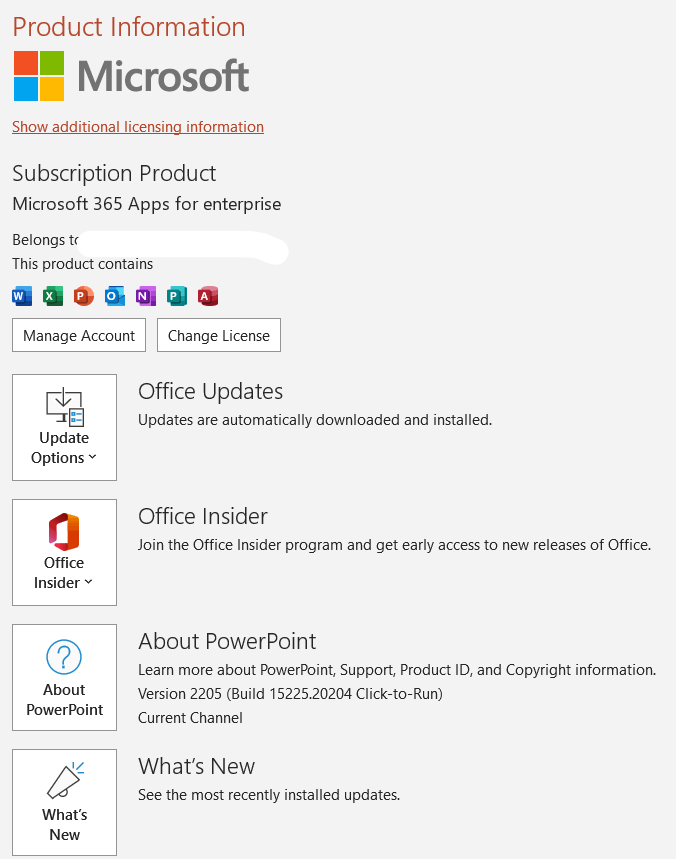
3.What is the version of your PowerPoint? Please go to File>Account, capture screenshot of Product Information, as shown below. We will try to test in same version and check the result.
Thanks for your patience and understanding.
Hope you keep safe and healthy always!
Sincerely,
Tina | Microsoft Community Moderator
***Note: In the event that you're unable to reply to this thread, please ensure that your Email address is verified in the Community Website by clicking on Your Account Name > "My Profile" > "Edit Profile" > Add your Email Address > tick "Receive email notifications" checkbox > click on "Save".***
' cx='32' cy='32' r='32' /%3E%3Ctext x='50%25' y='55%25' dominant-baseline='middle' text-anchor='middle' fill='%23FFF' %3EA%3C/text%3E%3C/svg%3E)

' cx='32' cy='32' r='32' /%3E%3Ctext x='50%25' y='55%25' dominant-baseline='middle' text-anchor='middle' fill='%23FFF' %3ESR%3C/text%3E%3C/svg%3E)