Share via

Power Point

Anonymous
2022-04-08T19:46:04+00:00

When I am "reusing" slides to insert them from one power point into another, I cannot scroll past slide 100 to get at later slides to insert them. Does anyone have an idea?

Microsoft 365 and Office | PowerPoint | For business | Other

Locked Question. This question was migrated from the Microsoft Support Community. You can vote on whether it's helpful, but you can't add comments or replies or follow the question.

0 comments No comments

7 answers

Sort by: Most helpful
  1. Anonymous
    2022-04-12T13:03:48+00:00

    Hi John SR Wilson, I can scroll through a regular presentation fine; I have many up to 150 slides. I cannot scroll through the slides when they are in the reuse slides mode to be inserted. See Stacey's image above.

    Thx,

    Sarah

    Was this answer helpful?

    0 comments No comments
  2. Anonymous
    2022-04-12T06:04:00+00:00

    Not sure if or how this will help but I can scroll way past 100.

    This is my version on Windows 10

    Was this answer helpful?

    0 comments No comments
  3. Anonymous
    2022-04-12T05:40:17+00:00

    Hi

    Thanks for your response.

    Hope the suggested solution can be helpful to you.

    If you need any further assistance, please feel free to post back.

    Best regards,

    Stacey

    Was this answer helpful?

    0 comments No comments
  4. Anonymous
    2022-04-11T19:23:22+00:00

    Thanks, Stacey,
    You had it correct - on the reuse slides it didn't scroll past 100 just like your image above. I will do your suggested workaround idea.

    SarahLiz

    Was this answer helpful?

    0 comments No comments
  5. Anonymous
    2022-04-09T03:01:01+00:00

    Hi

    Thank you for posting the thread on our forum.

    Based on your description, if you mean that in another presentation ,there have one more 100 slides, and you can't scroll past slides 100 to select the later slides to insert, such as slide 101, or slide 102?

    1. May I know if my understanding is correct? If so, we did a test in our end with PowerPoint. We try to reuse slides in another presentation with 108 slides, but when we scroll to 100, it stopped, we can't scroll to the later slides. We can reproduce your situation.
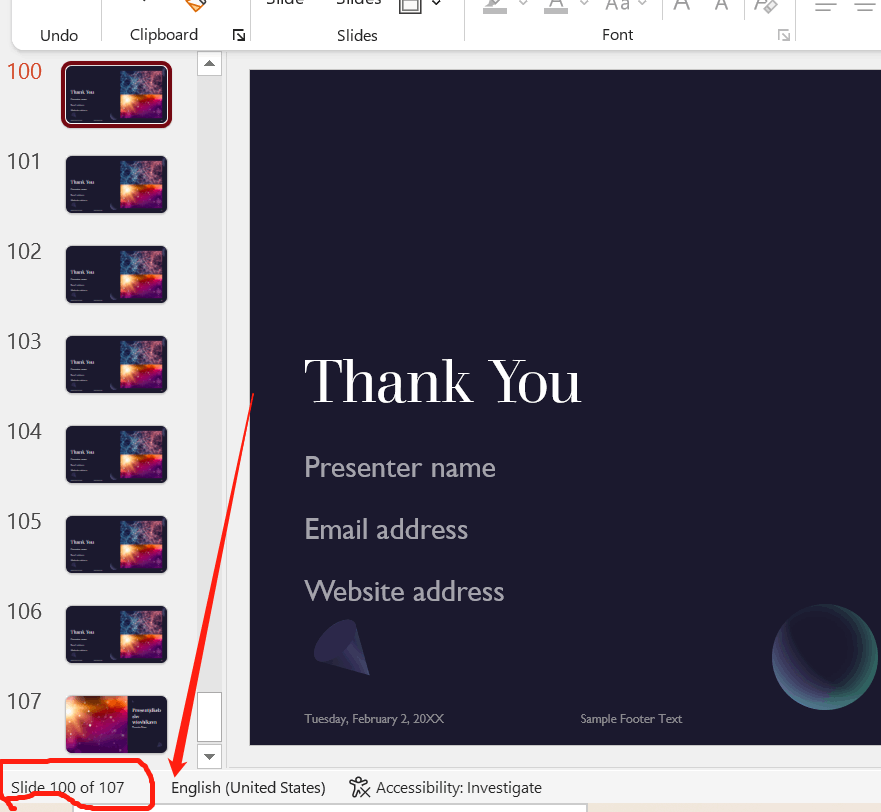

    1. So as a workaround, we suggest you can copy the later slides as a copy of a presentationo, then use the reuses slides to insert them. Or you can copy the slides to insert in the new presentation.
    2. We noticed there have a similiar thread and still not have a best solution, you can refer to Reuse slides limited - Microsoft Community
    3. Meanwhile, we suggest you can send your feedback to PowerPoint · Community (microsoft.com) to post your questions, , which is the best platform to let us hear from you and make our products and services better for you and others.

    Your understanding and patience will be highly appreciated!!

    Best regards,

    Stacey

    Was this answer helpful?

    0 comments No comments