Sharepoint Task List not syncing with MS Project when approvals are activated

Anonymous
2022-06-02T14:50:08+00:00

Hello.

I have synchronized an MPP file with Sharepoint and I have created the respective Site and Sharepoint Task List. I have mapped some fields and I have deleted the MPP file from my computer. All the syncs work fine (from Sharepoint to MS Project and to Outlook), till I activate the

Settings -> Versions Settings -> Content Approval

After that, when I try to sync I receive the famous message:
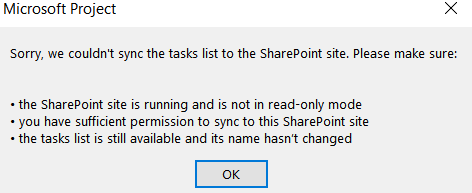
When I remove the Content approval, the two are synchronizing perfectly again. I have all the sufficient permissions to sync and the task list is still available and name hasn't changed. Also the site is running and not in read-only mode.

I have also tried to create the Approval Status column in Project in order to map it (in case this is something that creates the issue), with no success.

Any suggestions? The approval is important because I want the PM to approve a change made by the assignee.

Many thanks in advance

Microsoft 365 and Office | Project | For business | Other

Locked Question. This question was migrated from the Microsoft Support Community. You can vote on whether it's helpful, but you can't add comments or replies or follow the question.

0 comments No comments
{count} votes

2 answers

Sort by: Most helpful
  1. Anonymous
    2022-06-02T18:05:15+00:00

    Dear Gkouk,

    Thank you for posting in Microsoft Community.

    I understand that you have an issue on SharePoint Task Lists not syncing with MS Project when approvals are activated. Before moving forward, we need more detailed information about the situation you are experiencing.

    Kindly share with us the information below:

    How many task lists are affected.

    Content approval works only online and the lists will be on read-mode only once this feature is enabled. It is also the same with document library.

    Related articles:

    Sync with SharePoint tasks list from Project Professional

    Sync with a SharePoint tasks list

    Thank you for your kind understanding.

    We look forward to your response. Thanks for your cooperation. Stay safe and healthy always.

    Sincerely,

    Zee | Microsoft Community Moderator

    0 comments No comments
  2. Anonymous
    2022-06-03T07:48:32+00:00

    Dear Zee,

    Thank you for your response. I have tried this to various sharepoint online task lists that I have created by syncing an MPP file from Project professional. And always I get the same issue.

    When you say "Content approval works only online and the lists will be on read-mode only once this feature is enabled. It is also the same with document library.", does this mean that by default the content approval "breaks" the synchronization with MS Project? Because if the list must be read/write mode to be synchronized, then it doesn't make sense to activate the content approval.

    I read the articles shared once more. There is a limitation "If a project plan doesn’t contain a field that is required in SharePoint, the plan won’t sync. Add the required field as a custom field in Project.". But when I check on the Approval Status field, it is not a required one (without asterisk). Also, I have created the same field as custom field in Project, but still not working.

    If you need more information to share please let me know.

    Sincerely

    George

    0 comments No comments