Share via

Microsoft Project Web based Import problem

Anonymous
2022-05-04T16:00:24+00:00

MS Team,

I am trying to open an existing .mpp file which was created on desktop on my Project Web, but it is giving an error.

I get the below messsage:

We couldn’t open your project.

Return to Project Home and try opening it again. If you contact support, you can give the following information to the support agent. Correlation ID: 8daaxxx-4xx6-4xxd-8971-2b6706xxxx

Please assist me on how to open the .mpp file.

Thank you in advance.

Microsoft 365 and Office | Project | For business | Other

Locked Question. This question was migrated from the Microsoft Support Community. You can vote on whether it's helpful, but you can't add comments or replies or follow the question.

0 comments No comments

7 answers

Sort by: Most helpful
  1. Anonymous
    2022-05-05T17:14:58+00:00

    Mr. Dale,

    Thank you for your reply.

    Unfortunately, I have no idea if the MS Project Desktop was created in which version. :(

    Regards.

    Was this answer helpful?

    0 comments No comments
  2. Anonymous
    2022-05-05T17:13:48+00:00

    Dear Neha,

    Thank you for your quick reply.

    Unfortunately, I have no idea if the Project Desktop file meets the limits of Project for the web. :(

    I tried to open it again a few mins ago but got the same error.

    I guess the file must exceed the minimum requirements of Project for Web.

    Thank you once again.

    Have a good day.

    Was this answer helpful?

    0 comments No comments
  3. Dale Howard [MVP] 29,860 Reputation points MVP Volunteer Moderator
    2022-05-05T15:27:50+00:00

    Dhaval --

    What version of Microsoft Project was used to create the MPP file? Please let us know and we will try to help you.

    Was this answer helpful?

    0 comments No comments
  4. Anonymous
    2022-05-05T12:05:44+00:00

    Hi Dhaval,

    From your post, I understand you wanted to import .mpp file to Project for the web but while doing so, you are getting an error. I will try my best to help you assist with this issue.
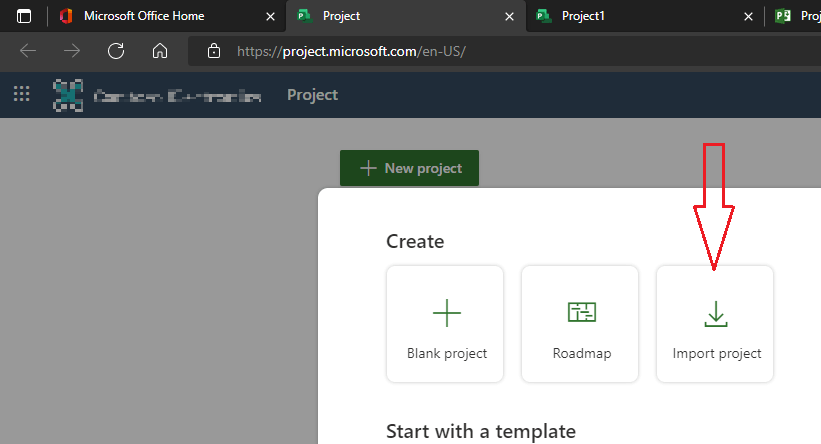
    Any .mpp files from Project Desktop 2016 or later should be importable into Project for the web. Please note that Project for the web has lower limits than Project Desktop. The project you want to import must not exceed Project for the web limits and boundaries. If it does and you attempt to import anyway, you will get an error. I’ll suggest you please check this linked article to confirm the project is within the limit.

    Please go to Project home and try importing .mpp file again:

    • Browse to the .mpp file you want to import, and then select Open.
    • In the Import custom fields dialog box, choose up to 10 custom fields that you want to import into your Project for the web project, then select Done, ensure that the columns are within the limit.
    • The Import complete message will list any features from your Project desktop file that aren't supported in Project for the web and what changes were made to allow import. Review these changes, and then select OK to start working on your project in Project for the web.

    Let me know if you can import mpp file now.

    Kind Regards,

    Neha

    Was this answer helpful?

    0 comments No comments
  5. Anonymous
    2022-05-04T16:14:01+00:00

    This is what I get when I try to import the .mpp file.

    Was this answer helpful?

    0 comments No comments