Sharepoint will only open in browser, not app

Anonymous
2022-10-17T17:33:25+00:00

I am only able to open a sharepoint file link in the browser. I can both view and edit in the browser and I can download the file but I need to be able to open the document in the PPT. I do not have that option when I right click on the document. I have tried to sign in under two different emails but I am unable to because I'm not a tenant of the client company sending me the document and they cannot add me as a tenant (usually don't have to with other people). Please, is there a setting or something that is blocking me from being able to open sharepoint docs in the Microsoft office app (PPT)?

Microsoft 365 and Office | PowerPoint | For home | Windows

Locked Question. This question was migrated from the Microsoft Support Community. You can vote on whether it's helpful, but you can't add comments or replies or follow the question.

0 comments No comments
{count} votes

5 answers

Sort by: Most helpful
  1. Anonymous
    2022-10-17T18:33:55+00:00

    Hello JbrandW,

    Thank you for coming to the forum and I will be happy to assist to explain this to you. I am sorry that you are facing this challenge but the setting to open in app is only available for users of Office 365 Business subscription. If you do not have a Business (work/school) subscription that option is not available to you.

    The only way around it is to buy a Business subscription that comes with this feature since the company will not share a subscription license with you. Or you manage the limitation as it is.

    If you are using Office 365 Personal or Home, or the free version, then you do not have this feature

    If there is anything else you need let me know.

    If none, have a wonderful rest of your day.

    Kind Regards Fuad

    0 comments No comments
  2. Anonymous
    2022-10-17T18:37:12+00:00

    Dear JbrandW,

    Greetings! Thank you for posting to Microsoft Community.

    So sorry for this inconvenience. Let us work together and solve this issue.

    Now, if you open the link, can you see the option to open in app as shown below? If yes what happens if you try to open in app? in case you get any error message, please send it to us.
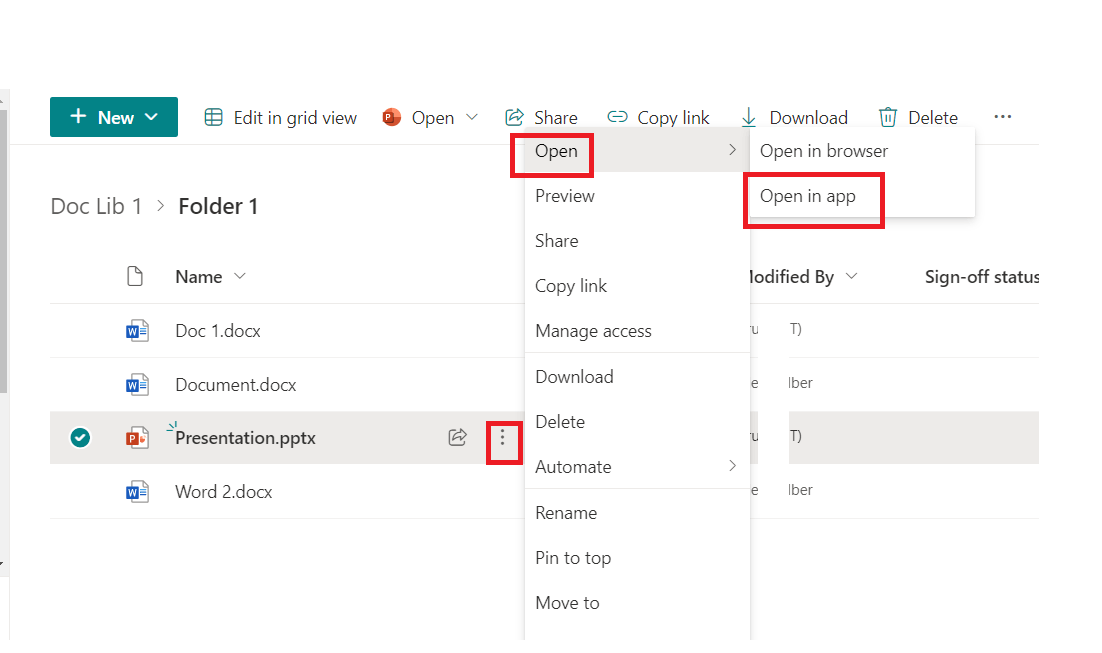
    1. Also, what is your PowerPoint version? some Office versions do not support document co-authoring. Go to PowerPoint > File > Account and take a screenshot of that page, upload it here for our reference.
    2. And you mentioned that you tried to sign in using different emails. You need to use the email that you used to access that file. because permissions to access this file are given to that particular account.
    3. Let me understand something. was this file sent to you using your company tenant account or personal account? And is in the same account you are signed into your PowerPoint app?

    Kindly understand that the initial reply may not solve issues, but we can collaborate and bring issues to a conclusion.

    Thanks for your cooperation and patience. Looking forward to your reply.

    Sincerely,

    Edwine | Microsoft Community Moderator

    0 comments No comments
  3. Anonymous
    2022-10-17T18:42:51+00:00

    thank you - after a bit of digging I figured this out myself, so I will look into my license options

    0 comments No comments
  4. Anonymous
    2022-10-17T18:43:50+00:00

    thank you - it came down to not having the correct license to use sharepoint. Appreciate your response

    0 comments No comments
  5. Anonymous
    2022-10-17T18:46:33+00:00

    Sorry that the solution will cost more than a penny, but if there is any other issue do let us know.

    0 comments No comments