Developer technologies | .NET | Xamarin
A Microsoft framework for building cross-platform mobile apps using .NET and C# with native performance and user interfaces.
This browser is no longer supported.
Upgrade to Microsoft Edge to take advantage of the latest features, security updates, and technical support.
' cx='32' cy='32' r='32' /%3E%3Ctext x='50%25' y='55%25' dominant-baseline='middle' text-anchor='middle' fill='%23FFF' %3EEG%3C/text%3E%3C/svg%3E)
I al not very much off a designer
Can somebody knows how to achieve this
I already know that I can achieve a Bubbles using <Path
but there is no way to add a Editor on a Bubbles
or label inside a buble.
I also need the editor to grow height as I type

Maybe you @Anonymous
By the way @Anonymous how are you so good with Xamarin forms, any recommendation to be better
A Microsoft framework for building cross-platform mobile apps using .NET and C# with native performance and user interfaces.
Answer accepted by question author
' cx='32' cy='32' r='32' /%3E%3Ctext x='50%25' y='55%25' dominant-baseline='middle' text-anchor='middle' fill='%23FFF' %3EA%3C/text%3E%3C/svg%3E)
Hello,
Welcome to our Microsoft Q&A platform!
You need the editor to grow height as you type, so draw Bubbles using <Path>, we need calculate the point at the runtime (It is quite complex). So I want to separate the Bubbles to two parts: Frame with corner and the draw the a triangle with <Path>. Then put two parts in the RelativeLayout, Here is code.
   <RelativeLayout HorizontalOptions="FillAndExpand" >
               <Frame
                   RelativeLayout.XConstraint="{ConstraintExpression Type=Constant, Constant=0}"
                    RelativeLayout.YConstraint="{ConstraintExpression Type=Constant, Constant=0}"
                   RelativeLayout.WidthConstraint="{ConstraintExpression Type=RelativeToParent, Property=Width, Factor=1}"
                   x:Name="myFrame"
                    Padding="0"
                    BackgroundColor="#00CCFF"
                    CornerRadius="20"
                    IsClippedToBounds="True" HorizontalOptions="FillAndExpand" VerticalOptions="Center">
                   <Editor
                       x:Name="Editor1"
                       Text="this"
                        AutoSize="TextChanges"
                        HorizontalOptions="FillAndExpand"
                        VerticalOptions="FillAndExpand" />
               </Frame>

               <Path Stroke="white"
                   Fill="#00CCFF"
                   Aspect="Uniform"
                   StrokeLineJoin="Round"
                    RelativeLayout.XConstraint="{ConstraintExpression Type=RelativeToView, ElementName=myFrame, Property=Width,Constant=-140}"
                    RelativeLayout.YConstraint="{ConstraintExpression Type=RelativeToView, ElementName=myFrame, Property=Height,Constant=-8 }"
                    RelativeLayout.WidthConstraint="100"
                    RelativeLayout.HeightConstraint="50" >
                   <Path.Data>
                       <PathGeometry>
                           <PathGeometry.Figures>
                               <PathFigureCollection>
                                   <PathFigure StartPoint="0,0">
                                       <PathFigure.Segments>
                                           <PathSegmentCollection>
                                               <PolyBezierSegment Points="0,0 10,0 15,10 15,0 20,0 30,0" />
                                           </PathSegmentCollection>
                                       </PathFigure.Segments>
                                   </PathFigure>
                               </PathFigureCollection>
                           </PathGeometry.Figures>
                       </PathGeometry>
                   </Path.Data>
               </Path>
           </RelativeLayout>
Here is running screenshot.
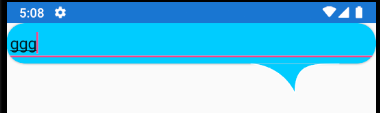

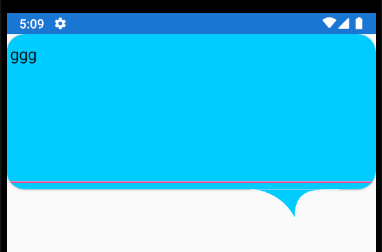
This way is not perfect, hope others have a better way to achieve it.
Best Regards,
Leon Lu
If the response is helpful, please click "Accept Answer" and upvote it.
Note: Please follow the steps in our documentation to enable e-mail notifications if you want to receive the related email notification for this thread.