Microsoft Security | Microsoft Entra | Microsoft Entra ID
A cloud-based identity and access management service for securing user authentication and resource access

This browser is no longer supported.
Upgrade to Microsoft Edge to take advantage of the latest features, security updates, and technical support.

Hi All,
Is it possible to remove a visual studio subscription and reset it up.
I created a Visual studio subscription using my @Microsoft Corporation .co.uk account which became disabled due to spending limits. Since the spending limit was uplifted I am no longer able to see the subscription in my @Microsoft Corporation .co.uk account.
The subscription id is ID: b25dc89c-11c0-45c5-b3aa-d746f5d151f3
Is it possible to find out where this subscription has gone and tie it back with my live account or if it cannot be found can it be deleted and reset up again?
Regards Manni
' cx='32' cy='32' r='32' /%3E%3Ctext x='50%25' y='55%25' dominant-baseline='middle' text-anchor='middle' fill='%23FFF' %3ESK%3C/text%3E%3C/svg%3E)
Request Id: dec1a9fb-3a47-4a28-b3cf-a732e1922600
Correlation Id: 03d38a1b-54aa-41a9-a669-914a49c9face
Timestamp: 2021-08-20T18:11:54Z
Message: AADSTS50020: User account 'boamahgsm@harsh.com .com' from identity provider 'live.com' does not exist in tenant 'HMD Global Oy' and cannot access the application '320bada1-5e32-4b75-824f-e7825a88d51e'(DeviceKitsAuthClient) in that tenant. The account needs to be added as an external user in the tenant first. Sign out and sign in again with a different Azure Active Directory user account.
hi

You shouldn't lose access to the subscription unless your VS license has expired perhaps. Have you checked this portal using your @Microsoft Corporation .co.uk account to see if you can see it - https://my.visualstudio.com/subscriptions

@Manni Khunkhuna
Thank you for your post!
When it comes to seeing your subscription within Azure, you can follow these steps to help troubleshoot this.
1) Make sure you're in the correct tenant
2) Search for and Navigate to Subscriptions
3) Confirm you have the correct filters applied to show any subscriptions within your Tenant.

If you still aren't able to see your subscription you can Search for an Navigate to Cost Management + Billing, or you can select the Click Here option within the Subscriptions service.

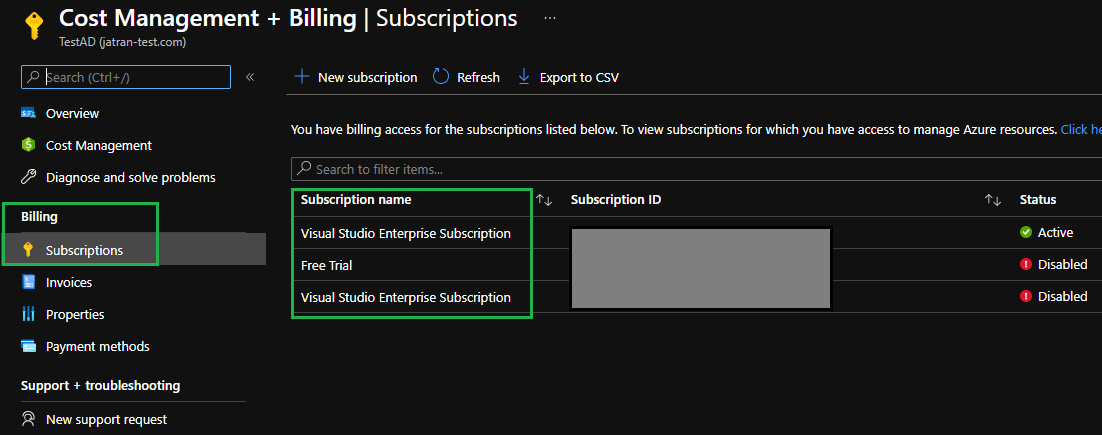
If you have any other questions or are still having issues, please let me know.
Thank you for your time and patience throughout this issue.
Please remember to "Accept Answer" if any answer/reply helped, so that others in the community facing similar issues can easily find the solution.
@Manni Khunkhuna
I just wanted to check in and see if you had any other questions or if you were able to resolve this issue?