Azure Functions
An Azure service that provides an event-driven serverless compute platform.
This browser is no longer supported.
Upgrade to Microsoft Edge to take advantage of the latest features, security updates, and technical support.
' cx='32' cy='32' r='32' /%3E%3Ctext x='50%25' y='55%25' dominant-baseline='middle' text-anchor='middle' fill='%23FFF' %3EKB%3C/text%3E%3C/svg%3E)
Hello;
I created an azure function that connects to Power BI service, retrieves logs and saves data in a Storage blob. Knowing that the service principal has access to all workspaces. There is a large number of datasets related to each workspace. My function runs almost several attempts. I would like to know how to solve this problem knowing that I cannot expand my resources.
Here is the code of the function :
   using namespace System.Net

   # Input bindings are passed in via param block.
   param($Request, $TriggerMetadata)


   # Interact with query parameters or the body of the request.
   $name = $Request.Query.Name
   if (-not $name) {
   $name = $Request.Body.Name
   }
   $body = "This HTTP triggered function executed successfully. Pass a name in the query string or in the request body for a personalized response."


   if ($name) {


   #Initialisation des paramétres d'identification pour le service principale
   $appId = $env:APP_ID
   $tenantId = $env:APP_TENANT_ID
   $secret = $env:APP_SECRET
   $password = ConvertTo-SecureString $secret -AsPlainText -Force
   $Cred = New-Object System.Management.Automation.PSCredential ($appId, $password)
   #Write-Output $Cred
   [Net.ServicePointManager]::SecurityProtocol = [Net.SecurityProtocolType]::Tls12
   #configure proxy
   $webclient=New-Object System.Net.WebClient
   $webclient.Proxy.Credentials = [System.Net.CredentialCache]::DefaultNetworkCredentials
   #Connexion au service POWER BI
   Connect-PowerBIServiceAccount -ServicePrincipal -Tenant $tenantId -Credential $Cred
   #Write-Host $name
   for($i=0;$i -lt $name;$i++)
   {
   $activitiesDate = [System.DateTime]::Now.Date.AddDays(-$i)
   $dateTimeStart = $activitiesDate.Date.ToString("s")
   $dateTimeEnd =  $activitiesDate.Date.AddHours(23).AddMinutes(59).AddSeconds(59).ToString("s")
   Write-Host $activitiesDate
   Write-Host $dateTimeStart
   Write-Host $dateTimeEnd
   #activities = Get-PowerBIActivityEvent -StartDateTime $dateTimeStart -EndDateTime: $dateTimeEnd | ConvertFrom-Json
   #Récuperation des données logs
   $activities = Get-PowerBIActivityEvent -StartDateTime $dateTimeStart -EndDateTime $dateTimeEnd | ConvertFrom-Json
   Write-Host $activities
   $psObjectForCsv = $activities | ForEach-Object {
       [PSCustomObject]@{
           "id"=$_.Id
           "RecordType" = $_.RecordType
           "CreationTime" = $_.CreationTime
           "Operation" = $_.Operation
           "OrganizationId" = $_.OrganizationId
           "UserType" = $_.UserType
           "UserKey" = $_.UserKey
           "Workload"=$_.Workload
           "UserId"=$_.UserId
           "ClientIP"=$_.ClientIP
           "UserAgent"=$_.UserAgent
           "Activity"=$_.Activity
           "ItemName"=$_.ItemName
           "WorkSpaceName"=$_.WorkSpaceName
           "DatasetName"=$_.DatasetName
           "ReportName"=$_.ReportName
           "WorkspaceId"=$_.WorkspaceId
           "ObjectId"=$_.ObjectId
           "DatasetId"=$_.DatasetId
           "ReportId"=$_.ReportId
           "EmbedTokenId"=$_.EmbedTokenId
           "IsSuccess"=$_.IsSuccess
           "ReportType"=$_.ReportType
           "RequestId"=$_.RequestId
           "ActivityId"=$_.ActivityId
           "DistributionMethod"=$_.DistributionMethod
           "ConsumptionMethod"=$_.ConsumptionMethod

       }
   }

   }

   #saving data in the output file blob

   Push-OutputBinding -Name outputBlob -Value $psObjectForCsv

   Write-Host $psObjectForCsv


   }
Here is the error that is shown.
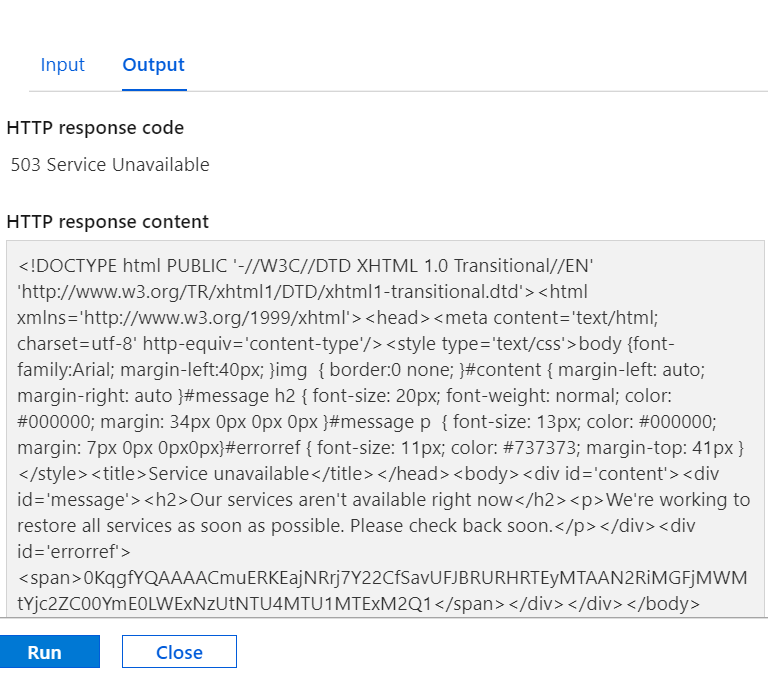 ]1
]1
Any help will be appreciated.


Hi @khouloud Belhaj , does your PowerShell script run successful on your local machine?
Hi @Ryan Hill yes it turns successful localy !
Where does it fail @khouloud Belhaj ? When running the function app, does Connect-PowerBIServiceAccount -ServicePrincipal -Tenant $tenantId -Credential $Cred run successfully?
Well , it used to work with success from my azure function and I could retrieve my bob files that contains logs.
But I noticed that after adding workspaces to the group I used to create the service principal, for an estimation of 10 times running the function, I have on blob file in my blob storage.
When running the function Connect-PowerBIServiceAccount -ServicePrincipal -Tenant $tenantId -Credential $Cred run successfully, sometimes it starts writing the logs and after a short time (20 seconds) I have on my screen " out of memory"

' cx='32' cy='32' r='32' /%3E%3Ctext x='50%25' y='55%25' dominant-baseline='middle' text-anchor='middle' fill='%23FFF' %3ERM%3C/text%3E%3C/svg%3E)
I know nothing about PowerBI, or about the contents of the parameter $Request, but this code looks suspicious (and it relates only to PowerShell):
Lines 7 - 11:
# Interact with query parameters or the body of the request.
$name = $Request.Query.Name
if (-not $name) {
$name = $Request.Body.Name
}
And then on line 32:
for($i=0;$i -lt $name;$i++)
It would seem, based solely on the naming of the values "Name" in the query or body, that it should hold a string. But what if, instead, it holds either a large integer value, or a negative integer value? The loop beginning on line 32 would run many more times than expected.
It would be a good idea to add some data validation to the script.
@Rich Matheisen : Thank you for your proposition , I will update the code to make it run in a better way.
But in my case I always pass the variable name as {"name": 2}
So I don't put a chance that the loops run more than I expected.
Every day it runs and It saves the logs related to the last day.Well, it used to do this treatment, but not any more since I have this issue.
Is there any update on this issue?
Hi @khouloud Belhaj ,
Just to confirm, your PowerShell scripts runs successfully on your local machine consistently. On your Azure Function, after adding additional workspaces, it would run ten iterations and you would the see the blobs in the storage account. But now, Connect-PowerBIServiceAccount will at times return an out of memory message. Does this occur after a successful execution of Connect-PowerBIServiceAccount or is it at random?
I'm not a Power BI expert in the least but the 503 and out of memory messages is leading me to point to your Power BI dataset(s) that you're connecting to. Is your Azure Function on a consumption plan or App Service plan? Have you verified that the PowerShell host your Azure Function, along with the Power BI modules, are of the same version of your local machine? Perhaps there was an update module applied to your function host. If you filter Get-PowerBIActivityEvent by -ActivityType and/or -User do you still get the same outcome? What about shorting the duration between $dateStartTime and $dateEndTime?
Also, the script you provided, did you omit certain portions for brevity? Taking another look, I'm curious what $webclient is for because I'm not seeing it used. Also
Hi @Ryan Hill
Thanks for your interaction!
As you can see in the screenshot, I have run my function and I'm connected to PowerBIService during few seconds, but it takes random execution to have the file that contains logs in my BlobStorage.
My azure function is on a consumption plan.Yes, I have the same version of PowerShellCore.
Filtering by -Activity Type and/or -User I have the same outcome. (I have access to all the workspaces)
I will try to retrieve the logs every hour and divide the log file into small pieces of data and see what it gives as a result.
For information I have 6 others functions that runs successfully using the same service principal connection.This is one of the functions.
The only function that I have issue with , is that GetActivities.
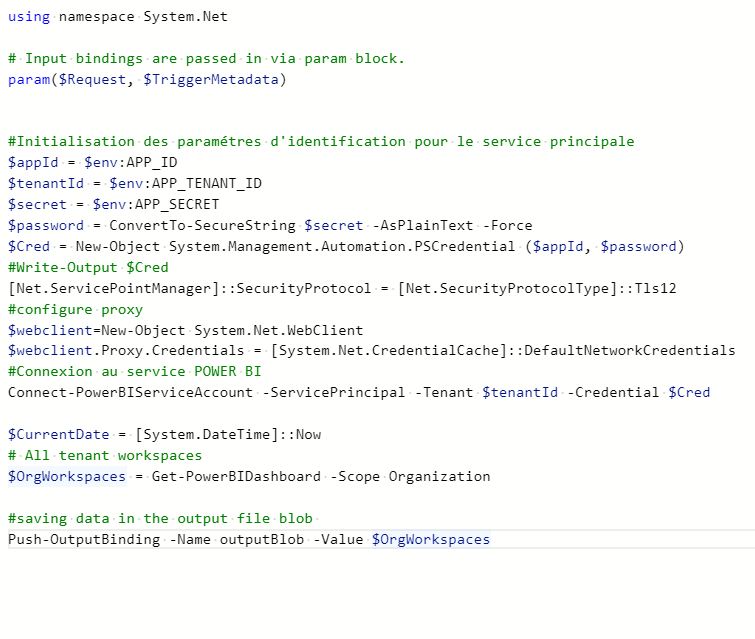

 ]4
]4

Since Get-PowerBIActivityEvent is the commandlet that previously worked and is no longer working, let's continue this offline. Please the private comment below.
@Ryan Hill : Hi Ryan , I wanted to check if you have received my email!
Hi @khouloud Belhaj , yes I have. Please check your email for next steps.
To benefit the community, @khouloud Belhaj 503 issue was the result of high memory consumption which exceeded the limits of the consumption plan. The best resolve for this issue is switching to a dedicated hosting plan which provides more resources. However, if that isn't an option, reducing the amount of data being retrieved should be explored.
