Microsoft 365 and Office | SharePoint | For business | Windows
A group of Microsoft Products and technologies used for sharing and managing content, knowledge, and applications.

This browser is no longer supported.
Upgrade to Microsoft Edge to take advantage of the latest features, security updates, and technical support.
' cx='32' cy='32' r='32' /%3E%3Ctext x='50%25' y='55%25' dominant-baseline='middle' text-anchor='middle' fill='%23FFF' %3ECB%3C/text%3E%3C/svg%3E)
Hi,
I have just setup our SharePoint environment on SharePoint Online. I am experimenting with just one library at the moment. I have been using SharePoint since the 2003 version and have implemented what I am trying to do in every on-premise version I have installed but I cannot get it to work with the online version.
I have added a column to the library. It is a "Yes/No" column called "Highlight". The idea is that if this is set to "Yes", it will be listed in a web part on the home page. On the on-premise versions I used a "Content Query" web part but with the Online version I am using a "Highlighted Content" web part.
Having added the column to the site (it will be used in other libraries as well) and waited for a while a "Crawled Property" has appeared in the "Site Schema". I added a "Managed Property" which maps the "Crawled Property" and all looks good. However, it doesn't work.
I've added a "Highlighted Content" web part with source set to document library adn set the document library name to my test one. Under "Find a column" I type a bit of the name "High" in this case and on the drop down for "Column Name" I find the name of the mapped property as expect. SharePoint knows it is a "Yes/No" property as it only gives me the option of "Equals". It defaults to "Yes" although I have the option of changing that to "No".
No matter which I pick the web part changes from showing the half dozen files in that library to 4 tiles. Three of these represent blanks I think and the first one has an icon of a pile of documents with the text "Automatically show content from your site". The reality is that all the documents have "Highlight" set to "No" expect for one but in any case, if I set the filter to "equals No" I would at least expect to see the ones where it is set to "No".
I have tried filtering on other columns that are included by default and that works so my question is:
Does filtering support custom columns and if it does then does it support "Yes/No" columns? If the answer to both these questions is yes then what else do I need to do to get it to work.
Thanks for any suggestions.
PS. I have no idea what the point of the mandatory field below called Tags is since it is a drop down that only offers a limited choice none of which are related to this query.
' cx='32' cy='32' r='32' /%3E%3Ctext x='50%25' y='55%25' dominant-baseline='middle' text-anchor='middle' fill='%23FFF' %3ECM%3C/text%3E%3C/svg%3E)
Thank you for your question. We are currently looking into this issue and will give you an update as soon as possible. Thank you for your understanding and support.
Hi @Colin Bruce ,
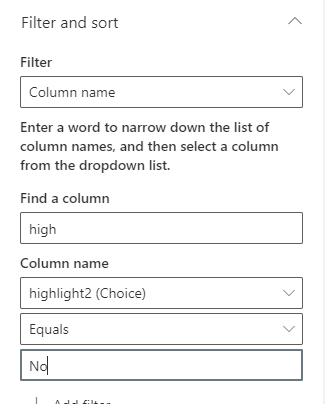
In the Highlighted Content webpart, you could use custom columns to filter. Per my test, when you select Column equals "Yes", the Highlighted Content webpart will show all files which were set to "Yes". SharePoint online seems only support "Yes/No" column when you select Column equals "Yes".
As a workaround, you could create a choice column "Highlight" with "Yes" and "No". Per my test, with choice column you will get files when you select Column equals "Yes" or "No".
If an Answer is helpful, please click "Accept Answer" and upvote it.
Note: Please follow the steps in our documentation to enable e-mail notifications if you want to receive the related email notification for this thread.
Hi @Colin Bruce ,
I'm checking how the things are going on about this issue. Is there any progress on this issue?