Dear Perry,
Good day! Thank you for posting your query in our community.
Per your description, you mentioned "tools", may I confirm whether you mean the below tabs?

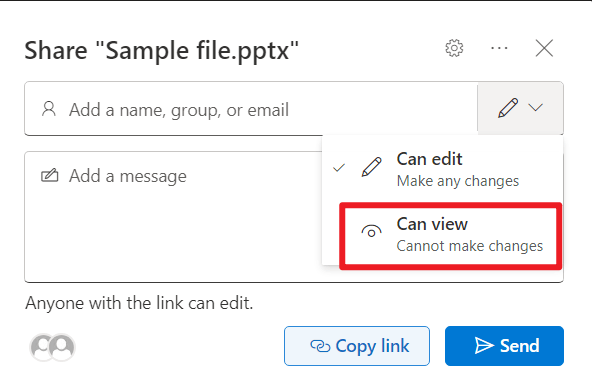
If yes, you can share the PowerPoint file to viewers with "Can view" permission. When viewers open the PowerPoint file on their side, they could see the tabs. However, those tabs are greyed out on their side, they don't have access to editing tools or interface elements:
If my understanding is wrong, please feel free to post back and correct me.
Sincerely,
Jazlyn | Microsoft Community Moderator
' cx='32' cy='32' r='32' /%3E%3Ctext x='50%25' y='55%25' dominant-baseline='middle' text-anchor='middle' fill='%23FFF' %3EA%3C/text%3E%3C/svg%3E)

' cx='32' cy='32' r='32' /%3E%3Ctext x='50%25' y='55%25' dominant-baseline='middle' text-anchor='middle' fill='%23FFF' %3ESR%3C/text%3E%3C/svg%3E)