It would have helped to see the full popup, but I guess that there is a predicate that filters out rows.
table scan operator
' cx='32' cy='32' r='32' /%3E%3Ctext x='50%25' y='55%25' dominant-baseline='middle' text-anchor='middle' fill='%23FFF' %3ES%3C/text%3E%3C/svg%3E)
sakuraime
2,351
Reputation points
From the execution plan , I have got a operator call table scan .
it has
estimated number of executions : 1.0.....
estimated number of rows to be read: 45899 < which is the rows of the table
estimated number of rows for all execution : 58.
Estimated number of rows per executions: 57
so why estimated number of rows for all execution is not 45899 ?
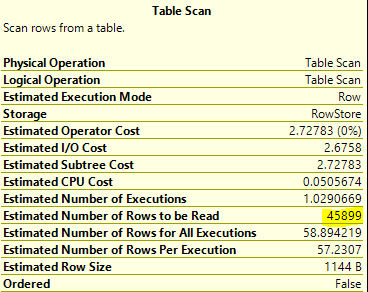
what means the table scan to be stopped at the row of 58 ?
SQL Server | Other
2 answers
Sort by: Most helpful
-
 Erland Sommarskog 129.4K Reputation points MVP Volunteer Moderator
2021-08-23T21:08:03.327+00:00 -
 CathyJi-MSFT 22,406 Reputation points Microsoft External Staff
2021-08-24T03:09:58.96+00:00 Hi @sakuraime ,
Estimated Number of Rows to be Read
This is an estimate of the number of rows that will be read by the operator as it is scanning the heap. The difference between this property and the Estimated Number of Rows or Estimated Number of Rows Per Execution property represents the number of rows that is estimated to be read but not returned due to the Predicate property.
Estimated Number of Rows for All Executions
An estimation of how many rows the operator will return for all (estimated) executions combined.
This property is not actually included in the execution plan. Tools such as Management Studio (version 18.5 and higher) computed it by multiplying the Estimated Number of Rows to the Estimated Number of Executions.Refer to the blog Table Scan.
If the response is helpful, please click "Accept Answer" and upvote it, as this could help other community members looking for similar thread.
-
sakuraime 2,351 Reputation points
2021-08-24T06:37:16.62+00:00 ok . So my concern whether it really have to READ ALL THE ROW each time ,given it has predicate or not .?
-
CathyJi-MSFT 22,406 Reputation points Microsoft External Staff
2021-08-24T08:08:55.83+00:00 Hi @sakuraime ,
A Predicate on a Table Scan does not reduce the amount of rows that is touched by the operator.
-
Erland Sommarskog 129.4K Reputation points MVP Volunteer Moderator
2021-08-24T20:52:03.383+00:00 ok . So my concern whether it really have to READ ALL THE ROW each time ,given it has predicate or not .?
It has to read the row to be able to evaluate the predicate...
-
sakuraime 2,351 Reputation points
2021-08-26T08:12:52.52+00:00 so how can I know the table scan able to evaluate the predicate until the last row ?
-
Erland Sommarskog 129.4K Reputation points MVP Volunteer Moderator
2021-08-26T20:54:36.173+00:00 I realise that English is not your native language (nor is it mine), but unfortunately your question is ungrammatical to the extent that it is not understandable. Can you rephrase and clarify?
Sign in to comment -