SQL Query to Pull Alert Report from SCOM Operations Database

Deepak 86 Reputation points
2021-08-23T12:48:07.503+00:00

Hello,

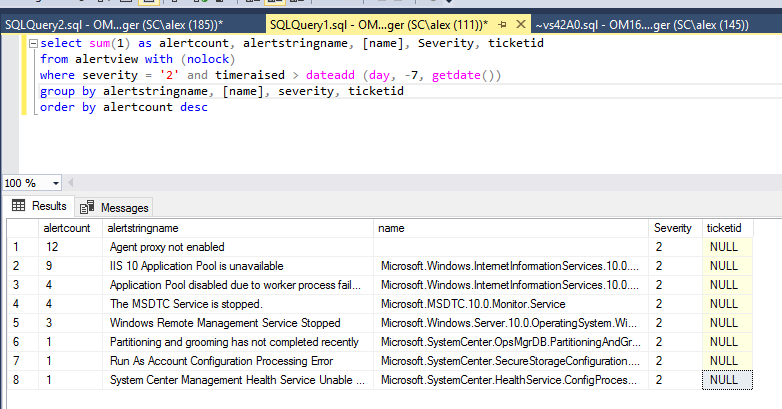
I am trying to run the query to pull the report as shown in the screenshot. The problem i am facing here is, Whenever i am seeing AlertCount greater than 1, Ticket ID will show as Null instead of listing all the ticket numbers.
Only when the AlertCount is 1, it is pulling the ticket number.

Can someone help me to customize this query so i can see all ticket numbers generated?

125664-scomsqlquery.png

System Center Operations Manager
A family of System Center products that provide infrastructure monitoring, help ensure the predictable performance and availability of vital applications, and offer comprehensive monitoring for datacenters and cloud, both private and public.
0 comments No comments
{count} votes

2 answers

Sort by: Most helpful
  1. AlexZhu-MSFT 6,596 Reputation points Moderator
    2021-08-24T00:39:38.95+00:00

    Hi,

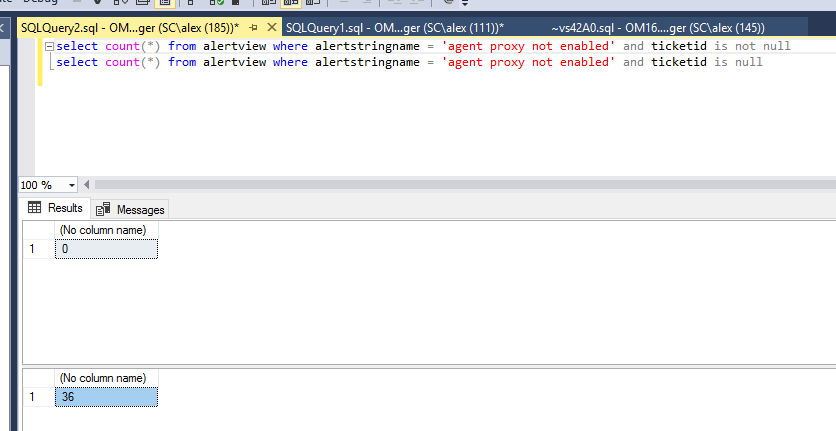
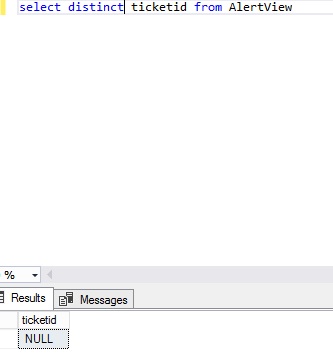
    I'm afraid the actual value of ticketid is null and this is not because of the alertcout > 1.

    Here's a quick test in my lab
    125768-scom-query-03.png

    To verify this, we may run the following query:

    select count(*) from alertview where alertstringname = 'ConfigMgr Server Component Issue' and ticketid is not null  
    

    125659-scom-query-02.png

    Alex
    If the response is helpful, please click "Accept Answer" and upvote it.


  2. System Center guy 691 Reputation points
    2021-09-01T03:09:56.067+00:00

    It is because your SQL statement grouping ticketid.

    1. Besides, by default the ticketid is null when a new alert is generated and need manually update its value.
      128224-pict001.jpg

    2) If you want count(*) is more than one and tickid is not null when you manually create same ticketid for same alert name, name and string path This means that you should assign same ticketid 'T12345' to 2 or alert which has alert name "ConfigMgr Server component issue', name "Microsoft.systemcenter2012. configurationmanager" and Monitoring object Path "ServerName.com"

    Roger

    0 comments No comments

Your answer

Answers can be marked as 'Accepted' by the question author and 'Recommended' by moderators, which helps users know the answer solved the author's problem.