Dear Glendora Chamber,
Greetings! Thank you for posting in Microsoft Community. We are happy to help you.
Per your description, it seems that you have issue when trying to access Project for the wen.
There could be several reasons why you are experiencing a white screen when trying to log in to your Microsoft Projects account.
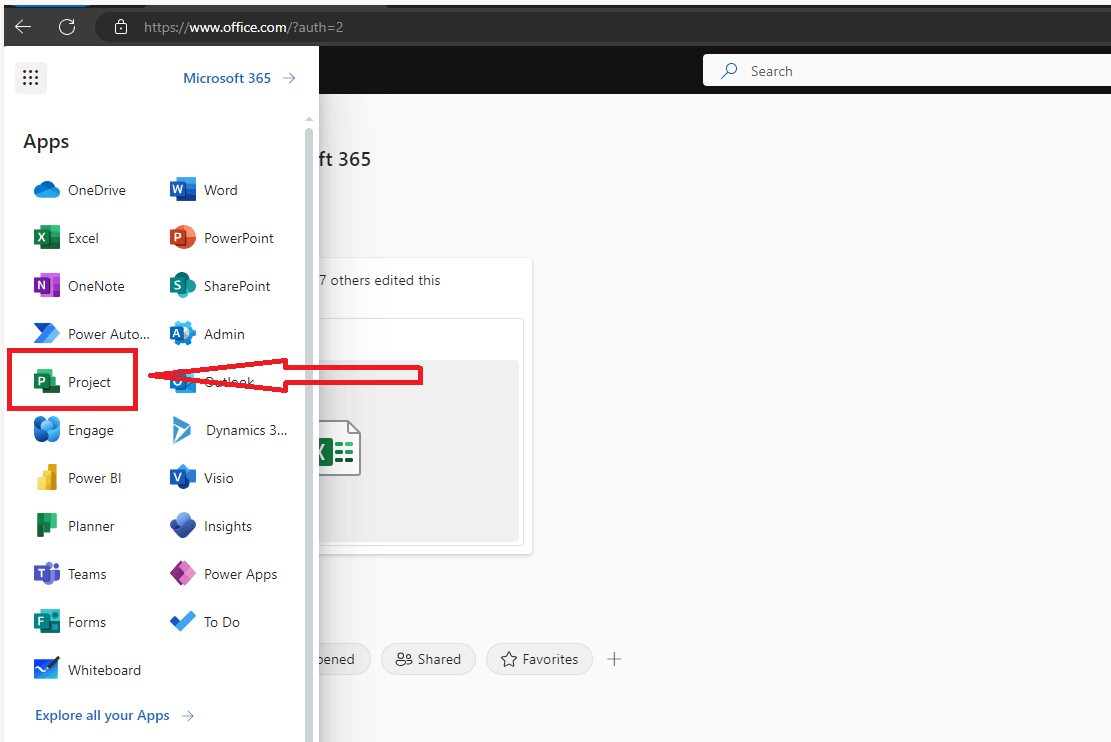
Does it work when you firstly access Microsoft 365 home page, then click App Launcher from upper-left corner(9 dots), choose Project to open Project for the web, as shown below?
Here are some troubleshooting steps you can try:
- Clear your browser cache and cookies. Sometimes, stored data can interfere with website functionality.
- Try using a different browser. If the issue persists, it could be a problem with your current browser.
- Check your internet connection. A weak or unstable connection can cause issues with website loading.
- Disable any browser extensions or add-ons that may be interfering with the website.
If issue persists, I understand how frustrating this situation can be and sincerely apologize for the inconvenience caused.
Could you share a full screenshot about the issue on your side?
What is the name of your Project subscription? Project Plan 1 or Project Plan 3?
Thanks for your time and cooperation! We hope you stay safe and healthy always.
Sincerely,
Tina | Microsoft Community Moderator
' cx='32' cy='32' r='32' /%3E%3Ctext x='50%25' y='55%25' dominant-baseline='middle' text-anchor='middle' fill='%23FFF' %3EA%3C/text%3E%3C/svg%3E)
