how to find merge shape button

Anonymous
2023-10-30T13:21:18+00:00

how to use merge shape in this version pp

Microsoft 365 and Office | PowerPoint | For education | Windows

Locked Question. This question was migrated from the Microsoft Support Community. You can vote on whether it's helpful, but you can't add comments or replies or follow the question.

0 comments No comments
{count} votes

4 answers

Sort by: Most helpful
  1. Anonymous
    2023-10-30T13:33:11+00:00

    Dear respected LUQMAN HAKEEM BIN AZHAR

    Good day! Thank you for posting to Microsoft Community. We are happy to help you.

    I’m sorry you’re having a problem but based on your description we can work together to resolve it.

    For the situation you encountered, we deeply understand the inconvenience caused and apologize for it.

    As per your description, if you are using the web versions of PowerPoint (PowerPoint for web), then, I'm Sorry PowerPoint for web (online) application don't have all the features of the full desktop version. That may be why you can't merge shapes.

    If you are using PowerPoint desktop client application, generally, to merge shapes on the new shape on PowerPoint, select the shapes you want to merge by holding down the Shift key and clicking on each shape. Go to the Shape Format tab and click on Merge Shapes.
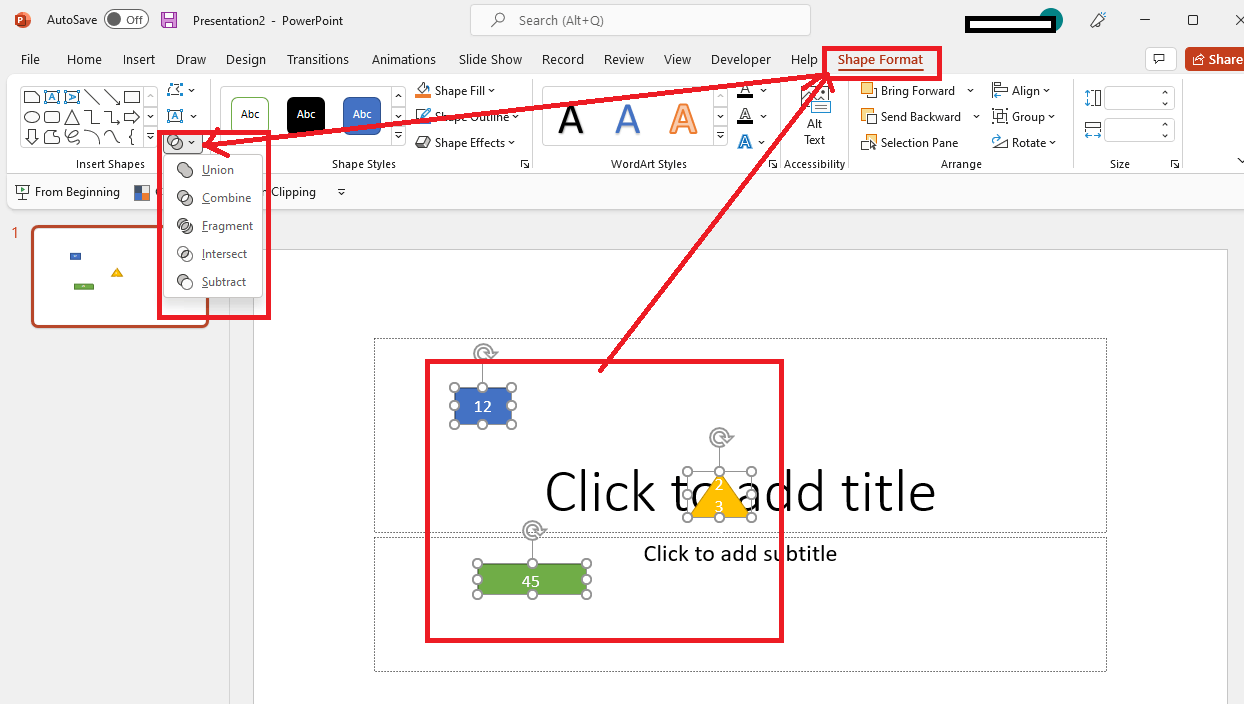
    Image

    .

    For your reference: Draw a picture by combining and merging shapes.

    If possible, could you please upload screenshot for our reference, so we can understand your exact scenario and provide our suggestion in a productive manner, perhaps some related screenshots will be helpful.

    We appreciate your understanding that sometimes the initial suggestions may not resolve the problem very soon. However, we can work together to narrow down and resolve the situation. So, please kindly provide more information below to let us work further.

    1. What’s your PowerPoint version? Open PowerPoint > File > Account > Production Information and share a screenshot of it.  (Please mask your private information.)
    2. Does the issue happens on all files or a specific one?

    Appreciate your patience and understanding and thank you for your time and cooperation.

    Sincerely,

    Waqas Muhammad

    0 comments No comments
  2. Anonymous
    2023-10-31T14:28:06+00:00

    Dear respected LUQMAN HAKEEM BIN AZHAR

    Good day! Thank you for posting to Microsoft Community. We are happy to help you.

    I’m sorry you’re having a problem but based on your description we can work together to resolve it.

    For the situation you encountered, we deeply understand the inconvenience caused and apologize for it.

    As per your description, if you are using the web versions of PowerPoint (PowerPoint for web), then, I'm Sorry PowerPoint for web (online) application don't have all the features of the full desktop version. That may be why you can't merge shapes.

    If you are using PowerPoint desktop client application, generally, to merge shapes on the new shape on PowerPoint, select the shapes you want to merge by holding down the Shift key and clicking on each shape. Go to the Shape Format tab and click on Merge Shapes.

    Image

    .

    For your reference: Draw a picture by combining and merging shapes.

    If possible, could you please upload screenshot for our reference, so we can understand your exact scenario and provide our suggestion in a productive manner, perhaps some related screenshots will be helpful.

    We appreciate your understanding that sometimes the initial suggestions may not resolve the problem very soon. However, we can work together to narrow down and resolve the situation. So, please kindly provide more information below to let us work further.

    1. What’s your PowerPoint version? Open PowerPoint > File > Account > Production Information and share a screenshot of it.  (Please mask your private information.)
    2. Does the issue happens on all files or a specific one?

    Appreciate your patience and understanding and thank you for your time and cooperation.


    Sincerely,

    Waqas Muhammad

    ouhhh even microsoft 365 also unable to use ?

    another question can i upgrade to latest version pp when i`m now using 2019 version

    0 comments No comments
  3. Anonymous
    2023-10-31T16:30:29+00:00

    Hi respected LUQMAN HAKEEM BIN AZHAR

    Thanks for your valuable feedback and sharing updates with us and I really appreciate your effort and your precious time doing. 

    And I appreciate your kind words.

    As per your above screenshot, it sees that you are using PowerPoint for web(online) app.  I'm Sorry PowerPoint for web (online) application don't have all the features merge shapes as like in PowerPoint for desktop client app version. 

    Regarding to, "another question can i upgrade to latest version pp when i`m now using 2019 version" you cannot upgrade Office 2019 which is a retail version of Office, to Office 365. 

    Your understanding and patience will be highly appreciated. I hope that you are keeping safe and well!

    Sincerely,

    Waqas Muhammad

    0 comments No comments
  4. Steve Rindsberg 99,086 Reputation points MVP Volunteer Moderator
    2023-11-01T15:46:01+00:00

    >> ouhhh even microsoft 365 also unable to use ?

    The web version lacks many features that the desktop version has. If you have a 365 license you can download the presentation to your desktop computer and use merge shapes there.

    >> another question can i upgrade to latest version pp when i`m now using 2019 version

    The 2019 desktop version already allows you to use Merge Shapes. Perhaps you don't need to upgrade.

    0 comments No comments