Hi Marcelino,
Thanks for posting in the community. We are happy to help you.
According to your description, before providing suggestions, I would like to collect more information to troubleshoot the situation.
- Does the situation happen in the PowerPoint web app (in the browser) or in the PowerPoint desktop app (PowerPoint for Windows)?
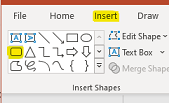
- I would like to confirm if the situation happens when you insert a built-in "Rectangle: Rounded Corners" via the Insert tab.
- If you use the PowerPoint desktop app, does it happen in a specific presentation or all presentations? You can create a new presentation to test.
If it happens in all presentations, please try to set PowerPoint into Safe Mode, then check again.
Close PowerPoint first, press Win + R, in the Run box, type powerpnt /safe, and click OK.
- If you use the PowerPoint desktop app, please provide your Office version and subscription information.
Click File> Account, please take a full screenshot of the current interface. After that, please click the "Insert Image" button to upload it.
We look forward to your response. Thanks for your cooperation.
Sincerely,
George | Microsoft Community Moderator
' cx='32' cy='32' r='32' /%3E%3Ctext x='50%25' y='55%25' dominant-baseline='middle' text-anchor='middle' fill='%23FFF' %3EA%3C/text%3E%3C/svg%3E)

' cx='32' cy='32' r='32' /%3E%3Ctext x='50%25' y='55%25' dominant-baseline='middle' text-anchor='middle' fill='%23FFF' %3ESR%3C/text%3E%3C/svg%3E)
' cx='32' cy='32' r='32' /%3E%3Ctext x='50%25' y='55%25' dominant-baseline='middle' text-anchor='middle' fill='%23FFF' %3ET5%3C/text%3E%3C/svg%3E)