Hello Matuszczak Lukasz,
Thank you for posting in Microsoft Community.
Per your description, it seems you are using Project desktop application, you are experiencing issues with printing from Team Planner view in Project.
If my understanding of the scenario is right, I also did a test in Project desktop application. I reproduced the same empty pages when printing from Team Planner view.
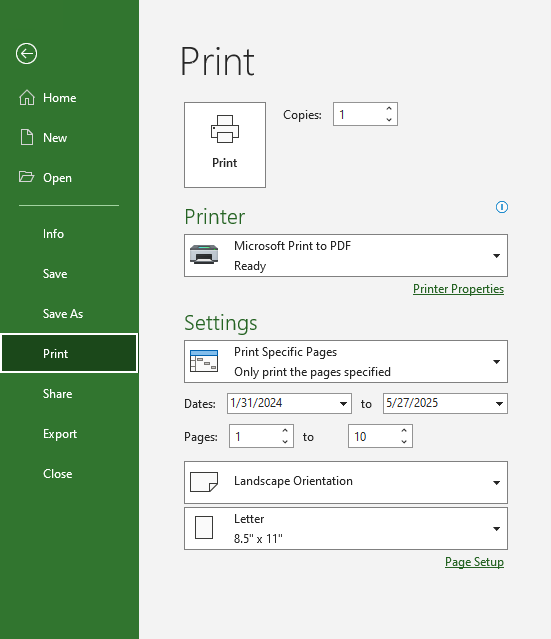
I tried adjusting printing setting from File > Print > Settings > Print Specific Pages.
It only allows to print consecutive pages but not specific, single page.
I notice you mentioned that Print size is 32 pages total (8 rows by 4 columns), first row of pages contains the data I need and all remaining are empty (just the timeline on the top of each page).
If the pages you want to print are page 1 to page 10, all remaining pages are empty, you may choose to print page from 1 to 10 in print settings. Below is an example.
If my understanding of the scenario is not consistent with yours, feel free to point it out, I will continue helping you.
By the way, please also share some screenshot about the issue and let me know the version of your Project, go to File>Account, then capture a full screenshot of Product Information from the Account page.
Please understand that our initial reply may not always immediately resolve the issue. However, with your help and more detailed information, we can work together to find a solution.
Thanks for your cooperation and understanding. I hope that you are keeping safe and well!
Sincerely,
Tina | Microsoft Community Moderator
' cx='32' cy='32' r='32' /%3E%3Ctext x='50%25' y='55%25' dominant-baseline='middle' text-anchor='middle' fill='%23FFF' %3EA%3C/text%3E%3C/svg%3E)
