Microsoft 365 and Office | Subscription, account, billing | For business | Other
Microsoft 365 features that help users manage their subscriptions, account settings, and billing information.

This browser is no longer supported.
Upgrade to Microsoft Edge to take advantage of the latest features, security updates, and technical support.
' cx='32' cy='32' r='32' /%3E%3Ctext x='50%25' y='55%25' dominant-baseline='middle' text-anchor='middle' fill='%23FFF' %3EA%3C/text%3E%3C/svg%3E)
Hi - I am set up as a delegate for another person's calendar. He has color rules assigned to his respective invites (e.g. purple for invites from X and red for invites from Z) - those color rules don't pull through on my side - everything is the same color on my side and I also need to see the colors. can you please advise on how to get that sorted?
Microsoft 365 features that help users manage their subscriptions, account settings, and billing information.
Locked Question. This question was migrated from the Microsoft Support Community. You can vote on whether it's helpful, but you can't add comments or replies or follow the question.
Hi Katherine, do you by any chance have other options we can try to solve this issue?
I was told by our IT department that I need to set the same color rules the owner has on my side seeing that his colors don't pull through to me as the delegate.
p.s. we checked the settings you sent us and they were all in order.
Thanks Katherine - we double check the settings and the are all in order, yet his colors (set up by rules on his side) still don't pull through to mine - even after I have deleted his calendar and mapped him again.
Dear Mariette Payne (ZA)
Thanks for choosing Microsoft Community.
Based on your description, I know the scenario you met.
If you want to see the color for the calendar you delegate, the mailbox owner needs to assign you at least “Can view all details” permissionsto you (Microsoft 365 Exchange Online) or “Reviewer” permissions (Exchange on-premises).
These permissions include the “Full Details” read permission which is required for displaying Color Categories.
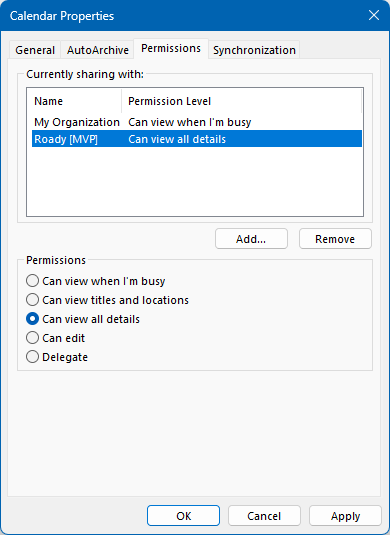
Permissions for Microsoft 365 Exchange Online.
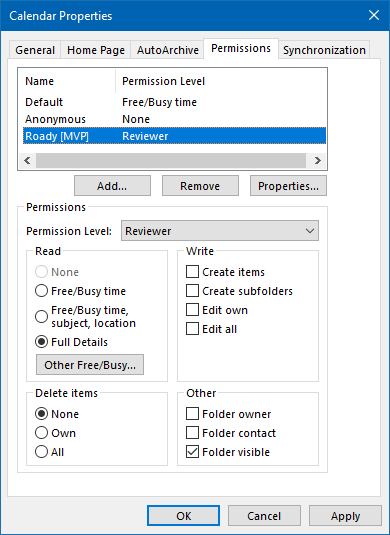
So please be kindly to check with calendar owner whether he gave you thr right permission. If not, please be kindly to give you permission again and check the result.
If there is any update, please feel free to let me know. Your understanding and co-operation are highly appreciated.
Thanks for your precious time. Have a nice day.
Sincerely
Katherine