Developer technologies | Windows Presentation Foundation
A part of the .NET Framework that provides a unified programming model for building line-of-business desktop applications on Windows.
This browser is no longer supported.
Upgrade to Microsoft Edge to take advantage of the latest features, security updates, and technical support.

Hello,
I got a following view:
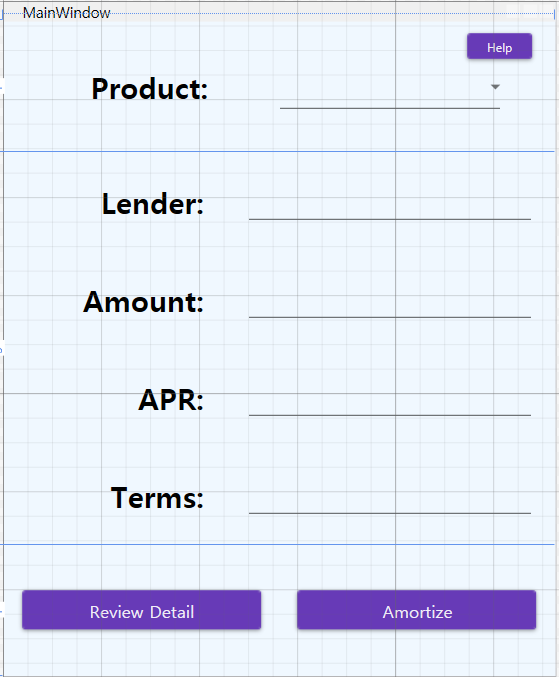
in above view, when I click "Help" button, I want to show my blog in another window.
so, I added window as follows:
<Window x:Class="PayEstPractice.Views.HelpWeb"
xmlns="http://schemas.microsoft.com/winfx/2006/xaml/presentation"
xmlns:x="http://schemas.microsoft.com/winfx/2006/xaml"
xmlns:d="http://schemas.microsoft.com/expression/blend/2008"
xmlns:mc="http://schemas.openxmlformats.org/markup-compatibility/2006"
xmlns:local="clr-namespace:PayEstPractice.Views"
xmlns:local1="clr-namespace:PayEstPractice.ViewModel"
xmlns:wv2="clr-namespace:Microsoft.Web.WebView2.Wpf;assembly=Microsoft.Web.WebView2.Wpf"
Background="AliceBlue"
ResizeMode="NoResize"
mc:Ignorable="d"
Title="HelpWeb" Height="500" Width="750">
<Window.DataContext>
<local1:PersonalViewModel/>
</Window.DataContext>
<Grid>
<DockPanel>
<wv2:WebView2 Name="webView" Source="https://mamdero.blogspot.com" />
</DockPanel>
</Grid>
</Window>
also, I wrote a command as follows:
    public ICommand HelpNaviCommand { get; }//to navigate help view

    HelpNaviCommand = new RelayCommand(HelpNavi);

    private void HelpNavi()
    {
        Views.HelpWeb hw = new Views.HelpWeb();
        string text = "https://mamdero.blogspot.com";

        hw.webView.CoreWebView2.Navigate(text);
    }
after build and running above code,
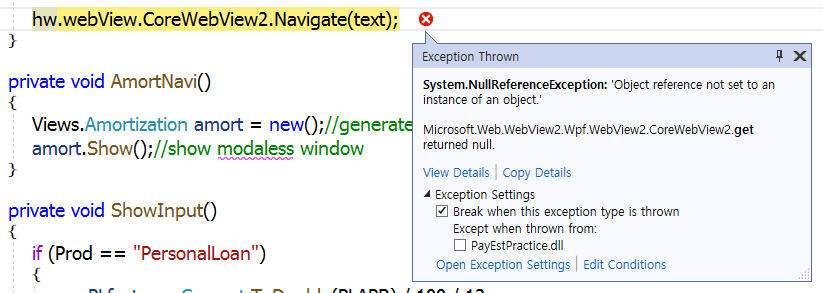
if someone pick my error, I'd be very appreciated.
thanks,
c00012
I fixed the problem by changing the code as follows:
    private async void HelpNavi()
    {
        Views.HelpWeb hw = new Views.HelpWeb();
        hw.Show();
        await hw.webView.EnsureCoreWebView2Async(null);
        hw.webView.CoreWebView2.Navigate(WebViewSource);
    }

WebView2 Constructor says:
Upon creation, the control's CoreWebView2 property will be null. .... There are two ways to cause the CoreWebView2 to be created: 1) Call the EnsureCoreWebView2Async(CoreWebView2Environment) method. .... 2) Set the Source property.
I set the source property like this:
public string WebViewSource { get; } = "https://mamdero.blogspot.com";
and changed the code like this:
HelpNaviCommand = new RelayCommand(HelpNavi);
    private void HelpNavi()
    {
        Views.HelpWeb hw = new Views.HelpWeb(); view webview2 control located
        hw.Show();
        hw.webView.CoreWebView2.Navigate(WebViewSource);
    }
but the result is the same. same error message.
How can I fix it?