
The Identity parameter accepts these:
A distinguished name
A GUID (objectGUID)
A security identifier (objectSid)
A SAM account name (sAMAccountName)
The "Name" property returned by Get-ADUser isn't acceptable. set-adaccountpassword
This browser is no longer supported.
Upgrade to Microsoft Edge to take advantage of the latest features, security updates, and technical support.
' cx='32' cy='32' r='32' /%3E%3Ctext x='50%25' y='55%25' dominant-baseline='middle' text-anchor='middle' fill='%23FFF' %3EA%3C/text%3E%3C/svg%3E)
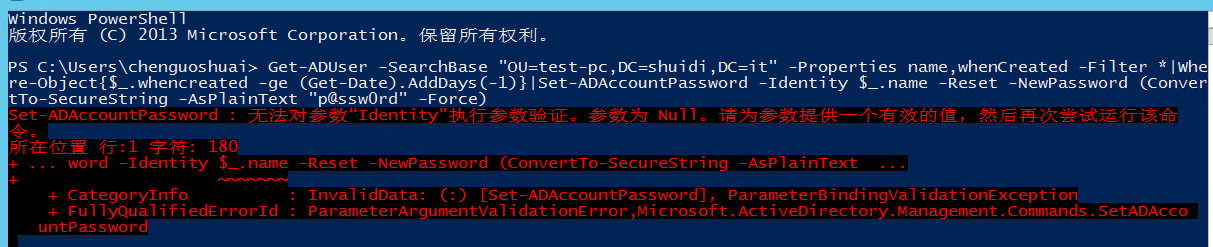
I use the following script to get an error:
Get-ADUser -SearchBase "OU=test-pc,DC=shuidi,DC=it" -Properties name,whenCreated -Filter *|Where-Object{$.whencreated -ge (Get-Date).AddDays(-1)}|Set-ADAccountPassword -Identity $.name -Reset -NewPassword (ConvertTo-SecureString -AsPlainText "p@ssw0rd" -Force)
' cx='32' cy='32' r='32' /%3E%3Ctext x='50%25' y='55%25' dominant-baseline='middle' text-anchor='middle' fill='%23FFF' %3ERM%3C/text%3E%3C/svg%3E)
The Identity parameter accepts these:
A distinguished name
A GUID (objectGUID)
A security identifier (objectSid)
A SAM account name (sAMAccountName)
The "Name" property returned by Get-ADUser isn't acceptable. set-adaccountpassword

Hello,
This link provide you the PowerShell code steps to Set-AD Account Password with all syntax
https://learn.microsoft.com/en-us/powershell/module/activedirectory/set-adaccountpassword?view=windowsserver2019-ps
Hope this Answers all your queries , if not please do repost back .
If an Answer is helpful, please click "Accept Answer" and upvote it : )
Happy helping
Mukesh
Thank you very much for the guidance of the two teachers, adding sAMAccountName, the implementation is successful
Get-ADUser -SearchBase "OU=test-pc,DC=shuidi,DC=it" -Properties sAMAccountName,whenCreated -Filter *|Where-Object{$.whencreated -ge (Get-Date).AddDays(-1)}|Set-ADAccountPassword -Identity $_.sAMAccountName -Reset -NewPassword (ConvertTo-SecureString -AsPlainText "p@ssw0rd" -Force)