Developer technologies | ASP.NET | Other
A set of technologies in .NET for building web applications and web services. Miscellaneous topics that do not fit into specific categories.
This browser is no longer supported.
Upgrade to Microsoft Edge to take advantage of the latest features, security updates, and technical support.
' cx='32' cy='32' r='32' /%3E%3Ctext x='50%25' y='55%25' dominant-baseline='middle' text-anchor='middle' fill='%23FFF' %3EB%3C/text%3E%3C/svg%3E)
i am using Treeview controls and mentioning direct file server path inside the NavigateURL.
we have new service account and has mapped with the file server folder and it's ready for accessible. (It's working fine).
when accessing through application, getting below error -->
cannot find "\USA\NYK\EMPDB\EMPDETAILS\EMP00101.drng" Make sure the path or Internet address is correct
The same folder will work when accessing through physical login of service account.
We did all the settings and configuration followed by many research. but, not able to get the solution..?
pls. advice.
</asp:TreeNode>
</Nodes>
</asp:TreeView>
<identity impersonate="true" userName="DUENET\DATAPM1010" password ="******"></identity>

The NavigationUrl must be a relative reference to a file within the hosted application. Either move the file to your web application or write an http file handler (which runs in the hosted application) to download the file from the file share and return it to the user's browser. Http file handlers are very common in web forms so a Google search show many code examples.
Also, you might consider running the application pool identity as the service account rather than impersonation.
can you pls. provide some sample code using tree view controls...
we trying many options to get the solution. but, nothing will work.. we spent more times on this..but, no solution...
can pls. anyone update regarding this.
since this is long pending and this is requirement want to complete as urgent.
This will be maintaining in ASPX page iitself. It means directly hard coded the file server path in NavigateUrl.
' cx='32' cy='32' r='32' /%3E%3Ctext x='50%25' y='55%25' dominant-baseline='middle' text-anchor='middle' fill='%23FFF' %3EYS%3C/text%3E%3C/svg%3E)
Hi @BeUnique ,
As far as I think,you need to use the impersonate identity. And could you tell us if the route of "\USA\NYK\EMPDB\EMPDETAILS\EMP00101.drng" is a full path? The NavigateURL is a relative path.Just like this:
"~\EMP00101.drng"
You could refer to below article:
126685-new-text-document-3.txt
Best regards,
Yijing Sun
Hi @Yijing Sun-MSFT
Thanks for your immediate response..
We are using full server path. Not using relative path.
Full server path : \USA\NYK\EMPDB\EMPDETAILS\EMP00101.drng.
Application located in one server.
and accessing file is located in another file server..
Hi @Yijing Sun-MSFT ,
Can you please give us idea how to solve this.
Without solving this issue we cannot proceed further anything in my project,....
Pls. Guide us...
Hi @BeUnique ,
I think you could try to create a virtual directory to make the files accessbile via http://. You could use http:// to access the other server 's file instead of the shared file.
Best regards,
Yijing Sun
Hi @Yijing Sun-MSFT ,
Thanks for your reply.
Yes. i tried to create the virtual directory.
but, still not working..
i tried below steps.

Note : file server path is mapped with service account (DUENET\DATAPM1010)
Hi @Yijing Sun-MSFT ,
Any update on this topic...? This is very very urgent.
Hi @BeUnique ,
According to your iis virtual directory images,I need you to post others to help me check your errors:
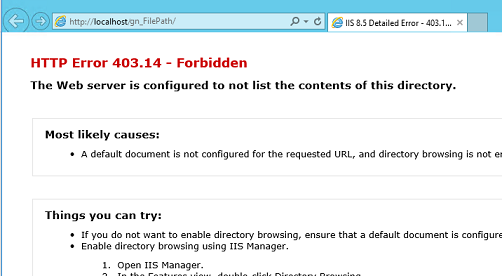
1. Could you post HTTP detail's error information? Just like this:

2. Could you post the image of 'Test setting' about your virtual directory? like this:

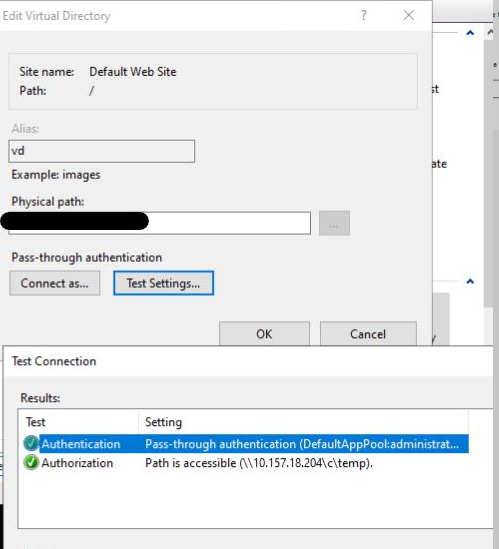
Best regards,
Yijing Sun
It's working...
Hi @BeUnique ,
congratulation! If you have other problems,you could post to us.
Best regards,
Yijing Sun
Thanks...
Thanks for your great help.
I mapped service account with file server in my local system..
and i logged again using service account with file server path.
It's working now..