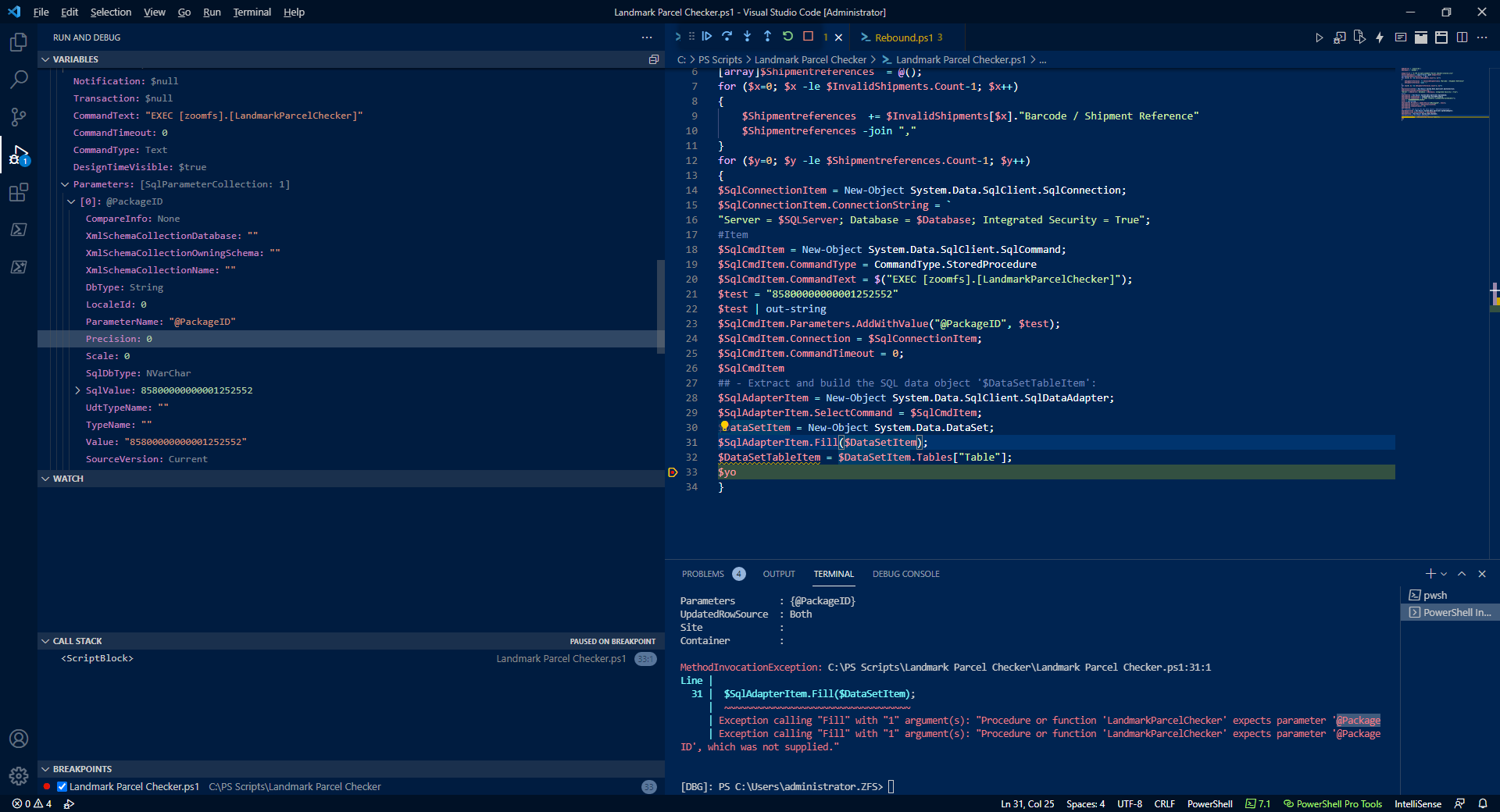
Passing paramater to sql server stored procedure using Powershell

Christopher Jack 1,616 Reputation points
2021-08-26T10:45:02.53+00:00

Hi,

I am trying to pass a paramater to a sql server stored procedure using

$SqlCmdItem.CommandText = $("EXEC [zoomfs].[LandmarkParcelChecker]" $Shipmentreferences[$y] );

However i am getting the error

Line |

19 | … $("EXEC [zoomfs].[LandmarkParcelChecker]" $Shipmentreferences[$y] );
| ~~~~~~~~~~~~~~~~~~~
| Unexpected token '$Shipmentreferences' in expression or statement.

THE SP Looks like

ALTER PROCEDURE [ZoomFS].[LandmarkParcelChecker]
-- Add the parameters for the stored procedure here
@PackageID varchar(24)
AS
BEGIN

If I have

 $SqlCmdItem.Parameters.AddWithValue("@PackageID", "85800000000001252552");  

I get the error

28 | $SqlAdapterItem.Fill($DataSetItem);
| ~~~~~~~~~~~~~~~~~~~~~~~~~~~~~~~~~~
| Exception calling "Fill" with "1" argument(s): "Procedure or function 'LandmarkParcelChecker'
| expects parameter '@PackageID', which was not supplied."

If I check the value in the variable it looks set, so I am confused as to why it is saying there is nothing there?

126718-image.png

Windows for business | Windows Server | User experience | PowerShell
Developer technologies | Transact-SQL
A Microsoft extension to the ANSI SQL language that includes procedural programming, local variables, and various support functions.
SQL Server | Other
0 comments No comments
{count} votes

2 answers

Sort by: Most helpful
  1. Olaf Helper 47,586 Reputation points
    2021-08-26T12:37:06.363+00:00

    $SqlCmdItem.CommandText = $("EXEC [zoomfs].[LandmarkParcelChecker]");

    You defined the command type as StoredProcedure, so SqlCommand expects only the SP name, nothing else.
    But you wrote a EXEC in front, so it looks mor like a SQL statement and then you have to define the parameter in the command text.

    Remove the EXEC or add the parameter name like

    $SqlCmdItem.CommandText = $("EXEC [zoomfs].[LandmarkParcelChecker] @PackageID");  
    

    See SqlCommand.CommandType Property => Remarks:
    When you set the CommandType property to StoredProcedure, you should set the CommandText property to the name of the stored procedure.

    0 comments No comments

  2. Limitless Technology 40,076 Reputation points
    2021-08-27T12:49:25.32+00:00

    Hello,

    Thank you for your question.

    Please follow this :

    $commands = $SQLResult | foreach-object -process { $_.output }>> output.ps1

    If the reply was helpful, please don't forget to upvote or accept as answer.

    0 comments No comments

Your answer

Answers can be marked as 'Accepted' by the question author and 'Recommended' by moderators, which helps users know the answer solved the author's problem.