Microsoft 365 and Office | SharePoint | For business | Windows
A group of Microsoft Products and technologies used for sharing and managing content, knowledge, and applications.

This browser is no longer supported.
Upgrade to Microsoft Edge to take advantage of the latest features, security updates, and technical support.
' cx='32' cy='32' r='32' /%3E%3Ctext x='50%25' y='55%25' dominant-baseline='middle' text-anchor='middle' fill='%23FFF' %3EAA%3C/text%3E%3C/svg%3E)
Hey there!
I'm trying to solve this, I've read tons of articles and questions here, but can´t get this done.
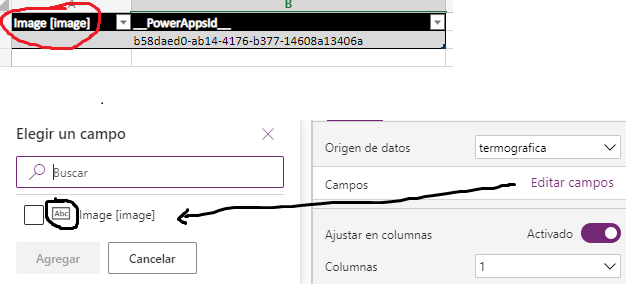
Here's the thing: I want to save an Image from my powerapps camera in my excel table. I have already named the column as "Image [image]" and also tried with "Image[image]" and powerapps still not recognizing that column as an image field.
' cx='32' cy='32' r='32' /%3E%3Ctext x='50%25' y='55%25' dominant-baseline='middle' text-anchor='middle' fill='%23FFF' %3ECM%3C/text%3E%3C/svg%3E)
Hi @ALURRALDE Agustin (renexter) ,
Power Apps is currently not supported in the Q&A forum.
Please start a new discussion via the Power Apps Community so that you can get dedicated support on this issue.
Thank you for your understanding.
If an Answer is helpful, please click "Accept Answer" and upvote it.
Note: Please follow the steps in our documentation to enable e-mail notifications if you want to receive the related email notification for this thread.