Dear respected,
Good day! Thank you for posting to Microsoft Community. We are happy to help you.
I’m sorry you’re having a problem with PowerPoint for iOS application on your iPad. For the situation you encountered, we deeply understand the inconvenience caused and apologize for it.
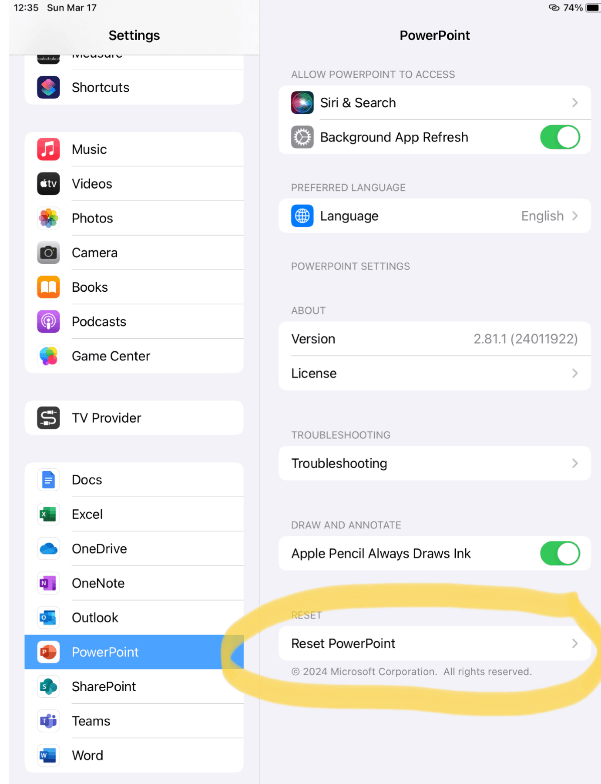
From our check and test on PowerPoint 2.81.1(24011922), it seems like we didn't reproduce a similar issue. In this situation, I will appreciate you can try the normal troubleshooting steps and tell us the result.
- Check if new documents created will have the same behavior
- Click Settings>Find PowerPoint in left-side bar>click Reset PowerPoint
- Reinstall PowerPoint
We appreciate your understanding that sometimes the initial suggestions may not resolve the problem very soon. However, we can work together to narrow down and resolve the situation. So, please kindly provide more information below to let us work further.
- If copy from other resources like Notes or Safari browsers will have the same unable to paste issue in PowerPoint?
- What's the version of your PowerPoint and iOS
We'll be here for you to wait for your updates. I appreciate your time and effort on checking these above and thank you for your time and cooperation. Here's to a good day!
Sincerely,
Mia | Microsoft Community Moderator
' cx='32' cy='32' r='32' /%3E%3Ctext x='50%25' y='55%25' dominant-baseline='middle' text-anchor='middle' fill='%23FFF' %3EA%3C/text%3E%3C/svg%3E)

