Developer technologies | Transact-SQL
A Microsoft extension to the ANSI SQL language that includes procedural programming, local variables, and various support functions.
This browser is no longer supported.
Upgrade to Microsoft Edge to take advantage of the latest features, security updates, and technical support.
' cx='32' cy='32' r='32' /%3E%3Ctext x='50%25' y='55%25' dominant-baseline='middle' text-anchor='middle' fill='%23FFF' %3EE%3C/text%3E%3C/svg%3E)
Using SQL 2014. I have a sql table with 4 columns for images. Column names image1, image2, image3, image4. All 4 images are displayed in a UI that allows for any of the 4 to be removed by the user. For example: image #3 can be removed. That leaves values for columns image1, image2, and image4. Image3 now has a null value.
When the UI is refreshed after removing image3, there is an obvious gap in the image display. Is there a way to move column image4 value to column image3 so that there will be no gaps between images on the UI?
Thanks.

It seems that you need something like this: https://learn.microsoft.com/en-us/answers/questions/80464/.
Or maybe you can do this:
update MyTable
set image3 = image4, image4 = null
where image3 is null

update MyTable
set image2 = image3, image3 = image4, image4 = null
where image2 is null

update MyTable
set image1 = image2, image2 = image3, image3 = image4, image4 = null
where image1 is null
To alter the specific row only, add a corresponding condition (such as '... and id=@currentRowID').
You can also move the columns after deletion. For example if you remove the image2, then move image3 and image4.

Hi @EM ,
Welcome to Microsoft Q&A!
Please refer below example and check whether it is helpful.
Create Table #Temp(image1 int, image2 int, image3 int, image4 int)

Insert into #Temp values
(1,3,NULL,5),
(1,NULL,4,5),
(1,NULL,NULL,4),
(NULL,NULL,3,NULL)

Select * from #Temp

;with cte as (
SELECT  rowid,IM, value
FROM  (select ROW_NUMBER() over (order by (select 1)) rowid,* FROM #Temp) p
UNPIVOT (value FOR IM IN (image1, image2, image3,image4)
)AS unpvt)
,cte1 as (
select *,ROW_NUMBER() over (partition by rowid order by IM) rn from cte)
select [image1], [image2], [image3],[image4] from
(select RowId,value,'image'+cast(rn as char(1)) IM from cte1 ) s
pivot (max(value) for IM in ([image1], [image2], [image3],[image4]))p
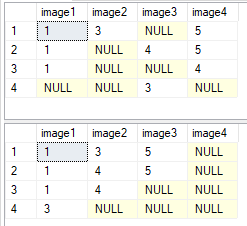
You could also refer this similar forum and find more solutions.
Best regards,
Melissa
If the answer is helpful, please click "Accept Answer" and upvote it.
Note: Please follow the steps in our documentation to enable e-mail notifications if you want to receive the related email notification for this thread.