Azure App Service
Azure App Service is a service used to create and deploy scalable, mission-critical web apps.
This browser is no longer supported.
Upgrade to Microsoft Edge to take advantage of the latest features, security updates, and technical support.
' cx='32' cy='32' r='32' /%3E%3Ctext x='50%25' y='55%25' dominant-baseline='middle' text-anchor='middle' fill='%23FFF' %3EJ%3C/text%3E%3C/svg%3E)
Hello
I have a Web App in Azure and I have also added an Identity Provider to the Web App. Now I need to create an ARM template to be able to automatically deploy the Web App again if needed.
When I hit the Export Template (when I am at my Webb App in Azure), I will get the ARM template (some JSON code). But, the settings for the Identity Provider is not included in the template.
Is it possible to generate a template for the Identity Provider settings?
If not, do you know of a good ARM template example including Identity Provider settings for a Web App.
I run version 2018-11-01.
Thanks
Julia
Azure App Service is a service used to create and deploy scalable, mission-critical web apps.
Answer accepted by question author

@Julia Thanks for reaching out. Yes, you can extract the identity provider configuration for your app from Azure Resource Explorer.
Here is a screenshot of what that looks like:
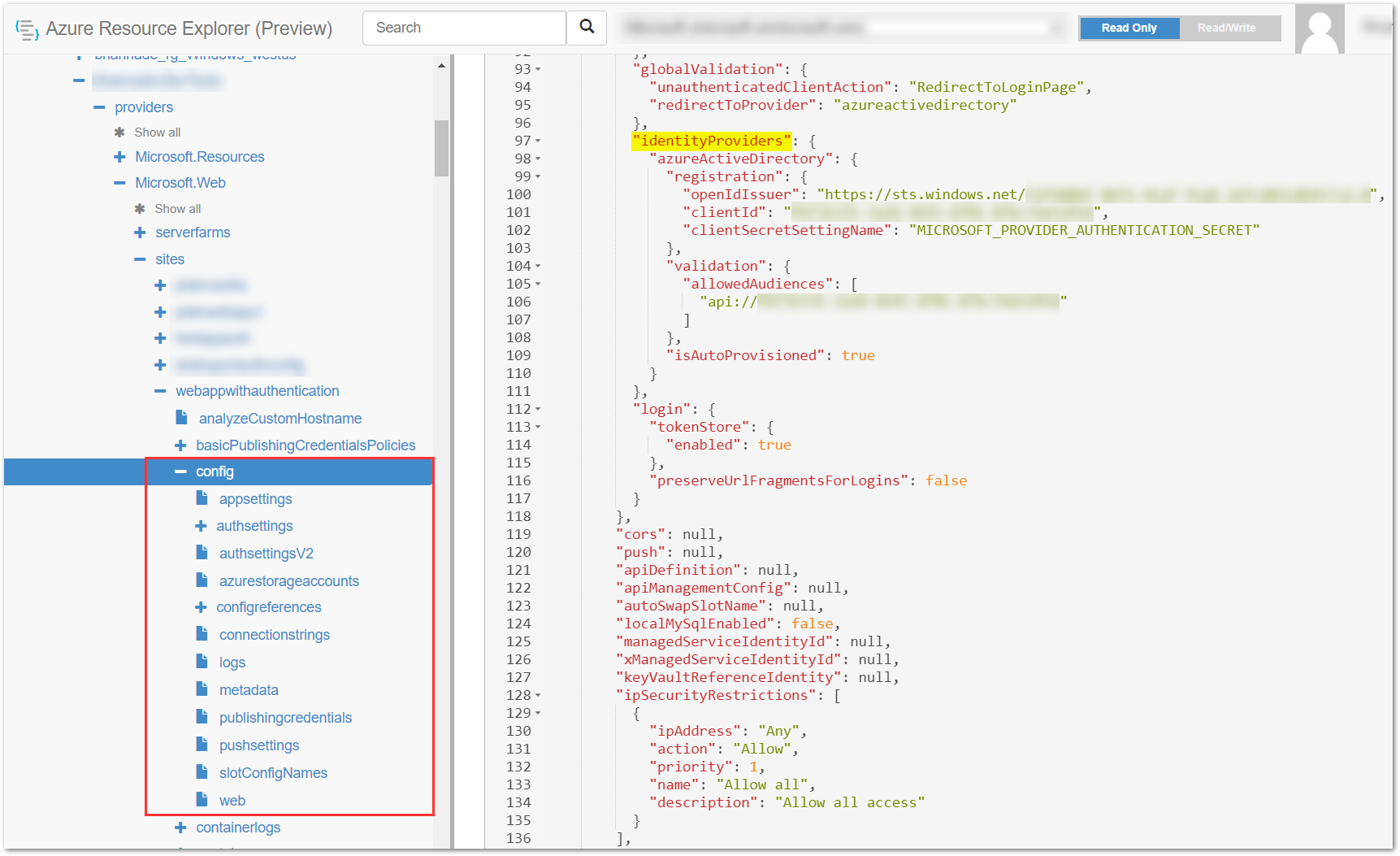
You can copy the relevant properties from here and incorporate into your ARM template.
Here is a sample ARM template that deploys an App Service Plan and a Web App with an existing registration for the Microsoft Identity Platform:
   {
       "$schema": "https://schema.management.azure.com/schemas/2019-04-01/deploymentTemplate.json#",
       "contentVersion": "1.0.0.0",
       "parameters": {
           "site_name": {
               "defaultValue": "webappwithauthentication",
               "type": "String"
           },
           "serverfarm_name": {
               "defaultValue": "webappwithauthenticationplan",
               "type": "String"
           }
       },
       "variables": {},
       "resources": [
           {
               "type": "Microsoft.Web/serverfarms",
               "apiVersion": "2021-01-15",
               "name": "[parameters('serverfarm_name')]",
               "location": "Central India",
               "sku": {
                   "name": "S1",
                   "tier": "Standard",
                   "size": "S1",
                   "family": "S",
                   "capacity": 1
               },
               "kind": "app",
               "properties": {
               }
           },
           {
               "type": "Microsoft.Web/sites",
               "apiVersion": "2021-01-15",
               "name": "[parameters('site_name')]",
               "location": "Central India",
               "dependsOn": [
                   "[resourceId('Microsoft.Web/serverfarms', parameters('serverfarm_name'))]"
               ],
               "kind": "app",
               "properties": {
                   "serverFarmId": "[resourceId('Microsoft.Web/serverfarms', parameters('serverfarm_name'))]"
               },
               "resources": [
                   {
                       "type": "config",
                       "apiVersion": "2021-01-15",
                       "name": "web",
                       "location": "Central India",
                       "dependsOn": [
                           "[resourceId('Microsoft.Web/sites', parameters('site_name'))]"
                       ],
                       "properties": {
                           "numberOfWorkers": 1,
                           "netFrameworkVersion": "v5.0",
                           "siteAuthEnabled": true,
                           "siteAuthSettingsV2": {
                               "platform": {
                                   "enabled": true
                               },
                               "globalValidation": {
                                   "unauthenticatedClientAction": "RedirectToLoginPage",
                                   "redirectToProvider": "azureactivedirectory"
                               },
                               "identityProviders": {
                                   "azureActiveDirectory": {
                                       "registration": {
                                           "openIdIssuer": "https://sts.windows.net/72f988bf-86f1-75a5-9q6z-2d7cd011db47/v2.0",
                                           "clientId": "fbf36335-8r51-4643-3352-87bc7da52456",
                                           "clientSecretSettingName": "MICROSOFT_PROVIDER_AUTHENTICATION_SECRET"
                                       },
                                       "validation": {
                                           "allowedAudiences": [
                                               "api://fbf36335-8r51-4643-3352-87bc7da52456"
                                           ]
                                       },
                                       "isAutoProvisioned": true
                                   }
                               },
                               "login": {
                                   "tokenStore": {
                                       "enabled": true
                                   },
                                   "preserveUrlFragmentsForLogins": false
                               }
                           },
                           "cors": null,
                           "push": null,
                           "apiDefinition": null,
                           "apiManagementConfig": null,
                           "autoSwapSlotName": null,
                           "localMySqlEnabled": false,
                           "managedServiceIdentityId": null,
                           "xManagedServiceIdentityId": null,
                           "keyVaultReferenceIdentity": null,
                           "ipSecurityRestrictions": [
                               {
                                   "ipAddress": "Any",
                                   "action": "Allow",
                                   "priority": 1,
                                   "name": "Allow all",
                                   "description": "Allow all access"
                               }
                           ],
                           "scmIpSecurityRestrictions": [
                               {
                                   "ipAddress": "Any",
                                   "action": "Allow",
                                   "priority": 1,
                                   "name": "Allow all",
                                   "description": "Allow all access"
                               }
                           ],
                           "scmIpSecurityRestrictionsUseMain": false,
                           "http20Enabled": false,
                           "minTlsVersion": "1.2",
                           "scmMinTlsVersion": "1.0",
                           "ftpsState": "AllAllowed",
                           "preWarmedInstanceCount": 0,
                           "functionAppScaleLimit": 0,
                           "healthCheckPath": null,
                           "fileChangeAuditEnabled": false,
                           "functionsRuntimeScaleMonitoringEnabled": false,
                           "websiteTimeZone": null,
                           "minimumElasticInstanceCount": 0
                       }
                   }
               ]
           }
       ]
   }
Hope this helps. Do let us know if you have further questions.
----------
If an answer is helpful, please "Accept answer" and/or "Up-Vote" which might help other community members reading this thread.