Outlook | Windows | Classic Outlook for Windows | For business
Using classic Outlook for Windows in business environments

This browser is no longer supported.
Upgrade to Microsoft Edge to take advantage of the latest features, security updates, and technical support.
' cx='32' cy='32' r='32' /%3E%3Ctext x='50%25' y='55%25' dominant-baseline='middle' text-anchor='middle' fill='%23FFF' %3EA%3C/text%3E%3C/svg%3E)
Hello,
I would like to ask about mails size in outlook.
Is it possible to somehow decrease size of incoming mails?
Our users experience troubles with ost file that overgrows too fast.
We have 6 month archive policy, but it is still not enough.
So we are wondering if it's somehow possible do decrease size of incoming mails.
Best regards,
Ruslan
Using classic Outlook for Windows in business environments
The administration and maintenance of Microsoft Exchange Server to ensure secure, reliable, and efficient email and collaboration services across an organization.
Answer accepted by question author
' cx='32' cy='32' r='32' /%3E%3Ctext x='50%25' y='55%25' dominant-baseline='middle' text-anchor='middle' fill='%23FFF' %3EYS%3C/text%3E%3C/svg%3E)
Hi @Anonymous ,
Is it possible to somehow decrease size of incoming mails?
Our users experience troubles with ost file that overgrows too fast.
To the best of my knowledge, I'm afraid it's not feasible to shrink the size of incoming mails. But regarding your concern about the large size of OST files, I'd recommend adjusting how much mail to keep offline by moving the slider in the offline settings to less amount of time:
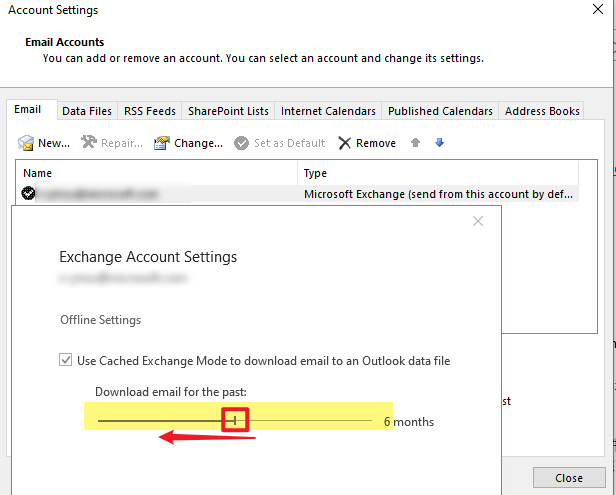
Furthermore, below is a document about how to reduce the data file size in Outlook client:
Reduce the size of your mailbox and Outlook Data Files (.pst and .ost)
It introduces several ways to clean up items in the mailbox and how to manually compact the OST file after deleting items. You can share the document with the users so that they can manually decrease the OST file size when necessary.
In addition, from the perspective of Exchange server side, you may consider updating the retention policy in your organization to control the lifecycle of emails. For more details, you may refer to: Create a retention policy in Exchange Server.
If an Answer is helpful, please click "Accept Answer" and upvote it.
Note: Please follow the steps in our documentation to enable e-mail notifications if you want to receive the related email notification for this thread.