SQL Server Reporting Services
A SQL Server technology that supports the creation, management, and delivery of both traditional, paper-oriented reports and interactive, web-based reports.
This browser is no longer supported.
Upgrade to Microsoft Edge to take advantage of the latest features, security updates, and technical support.
' cx='32' cy='32' r='32' /%3E%3Ctext x='50%25' y='55%25' dominant-baseline='middle' text-anchor='middle' fill='%23FFF' %3EB%3C/text%3E%3C/svg%3E)
I am creating a report to show the number of students and staff that are vaccinated. I tried just doing it in SQL and then just place the counts in the corresponding cells, but this created duplicate category rows. These results are in the image below.

The SQL in my dataset returns the counts of all vaccinated people. I should be able to enter count expressions in the 2nd column, but how do I specify which value I want to count?
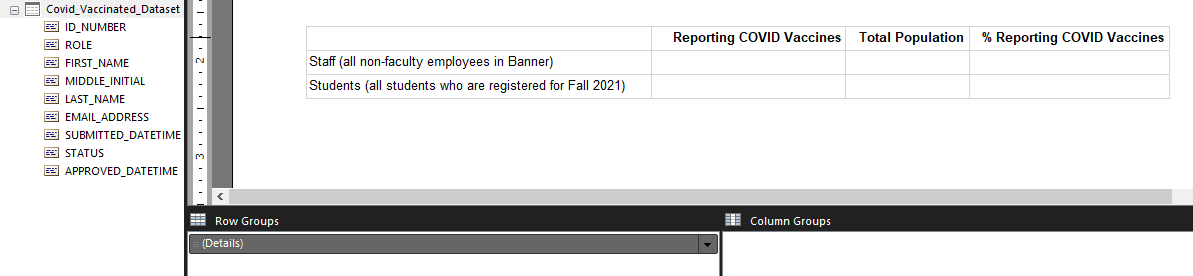
I figured I would add a second dataset to count people for the total population and do the same process to add them to the 3rd column.
' cx='32' cy='32' r='32' /%3E%3Ctext x='50%25' y='55%25' dominant-baseline='middle' text-anchor='middle' fill='%23FFF' %3EI1%3C/text%3E%3C/svg%3E)
Hi @Bob ,
You can use expressions to implement this report, but it is more troublesome. In comparison, it is more convenient to use sql query. You can use this query statement to create another dataset:
select  (select count(*) from casetest where role ='student' ) as StudentTotalCount,
  (select count(*)  from casetest where role = 'student' and status = 1) as StudentVaccinateCount,
   (select count(*) from casetest where role ='staff') as StaffTotalCount,
  (select count(*)  from casetest where role = 'staff' and status = 1) as StaffVaccinateCount
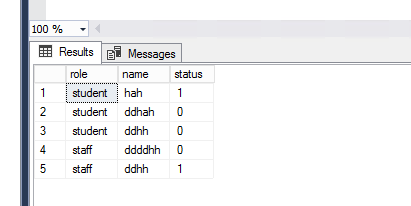
here is my table
Best Regards,
Isabella
If the answer is helpful, please click "Accept Answer" and upvote it.
Note: Please follow the steps in our documentation to enable e-mail notifications if you want to receive the related email notification for this thread.