


Share via

windows resource manager

xiao zhongshuai 176 Reputation points
2021-09-01T01:43:12.34+00:00

128065-%E5%9B%BE%E7%89%87.png

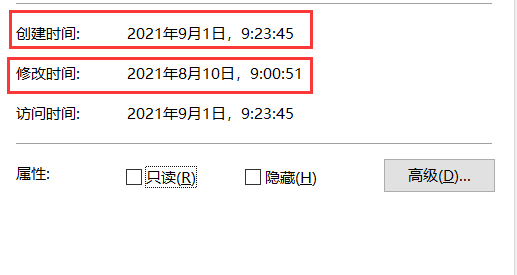
the file's create time is big than modify time.

and the resource manager always run F4.

i guess my os must be broken or resource manager is broken.

Windows for business | Windows Server | User experience | Other
0 comments No comments

Answer accepted by question author

Leon Laude 86,201 Reputation points
2021-09-01T05:58:25.353+00:00

Hi @xiao zhongshuai ,

This is not an abnormal behaviour, if you create a file from scratch, the file will get a creation time of "now", and a modification date of "now".

If you for example copy this file to another folder/drive, Windows will keep the modification time, but the creation time of that file will be set to the time you copied the file to that drive (i.e. the time the file was created on that drive).

So the creation time is actually correct:

  • The last time the contents of the file were changed is stored in the modification time.
  • The time the file was created on this very drive is stored in the creation time.

----------

If the reply was helpful please don't forget to upvote and/or accept as answer, thank you!

Best regards,
Leon

Was this answer helpful?

0 comments No comments

1 additional answer

Sort by: Most helpful
  1. Limitless Technology 40,106 Reputation points
    2021-09-01T13:06:42.907+00:00

    Hi there,
    It is nothing to worry about and this doesn't mean a corrupted Windows .
    I would like to known did you create this file from scratch on the PC ?

    Typically the extracted files will have a last modification timestamp assigned from the archive contents (which is typically in the past unless you are a time traveller). As far as the filesystem is concerned, these files have just been created though.

    Hope this Answers all your queries , if not please do repost back .
    If an Answer is helpful, please click "Accept Answer" and upvote it : )

    Was this answer helpful?

    0 comments No comments

Your answer

Answers can be marked as 'Accepted' by the question author and 'Recommended' by moderators, which helps users know the answer solved the author's problem.