Microsoft 365 and Office | Subscription, account, billing | Other | Windows
Microsoft 365 features that help users manage their subscriptions, account settings, and billing information.

This browser is no longer supported.
Upgrade to Microsoft Edge to take advantage of the latest features, security updates, and technical support.
' cx='32' cy='32' r='32' /%3E%3Ctext x='50%25' y='55%25' dominant-baseline='middle' text-anchor='middle' fill='%23FFF' %3EA%3C/text%3E%3C/svg%3E)
I have one subscription on my outlook email and I just noticed I have a family subscription on another email. I need to cancel the outlook one. How do I do this?
Microsoft 365 features that help users manage their subscriptions, account settings, and billing information.
Locked Question. This question was migrated from the Microsoft Support Community. You can vote on whether it's helpful, but you can't add comments or replies or follow the question.
Hello, sandra rainaldi
Thanks for your post in Microsoft community.
I realized that you have a problem with cancelling your subscription. I understand how you feel.
Please sign in this website with your Outlook email address: Microsoft account | Services & subscriptions.
Then try to find the subscription you don't want from that page and click Manage -> Cancel to cancel it.
For more information, see Cancel your Microsoft subscription - Microsoft Support.
Typically, there are two privacy guidelines restrict this community support for now:
If you have trouble canceling the subscription, I sincerely recommend contacting Microsoft Online Chat Support to solve your issue and avoid your personal information being revealed in this public forum.
I will guide you to the right place.
Note: It doesn't have to be an account associated with the subscription. Just log in with another available account. For example, you can sign in with the Microsoft account which you are using to post this thread. Then provide your information to the Online Chat Support. 3. Enter your issue in the search box. For example, subscriptions/invoices/refunds. 4. Click Get Help, then click Contact Supp ort at the bottom of the page.
[
- Select Chat with a support agent in a web browser.
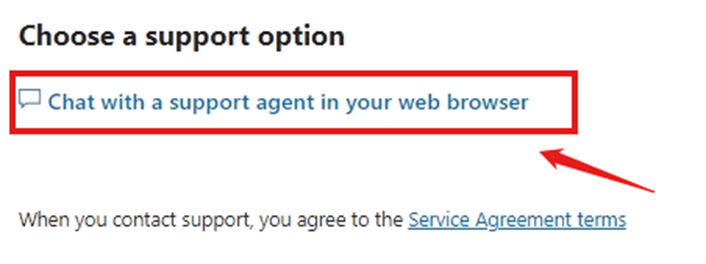
Please note: The Chat support team only works at certain times, so if the last window says you are not available, try to open it again the next day.
Thank you for your understanding and cooperation. I hope your problem will be resolved successfully.
Best wishes,
Lucia Wu - MSFT | Microsoft Community Support Specialist