Does this imply that if we want to link a PowerPoint file to a chart in Excel, we need to stop using OneDrive and keep everything on our hard drive? I'm having a similar problem. When I click on Update Link in PowerPoint, I get the message "The linked file was unavailable and can't be updated." I was on a conference call this week with someone who was having the exact same problem, so I don't think the problem is on my end. Sounds like another bug in OneDrive.
PowerPoint Does Not Update Linked Excel Charts
I've found that my PowerPoint does not update linked Excel charts properly. Here's the steps I'm using.
- Copy a chart from a saved Excel file. Both Excel and PowerPoint files are saved in OneDrive
- Paste the chart into PowerPoint slide, choose "Keep Source Formatting & Link Data"
- Update the data in Excel and observe that the PowerPoint slide does not update as expected.
- Click the Refresh Data Button and it does update.
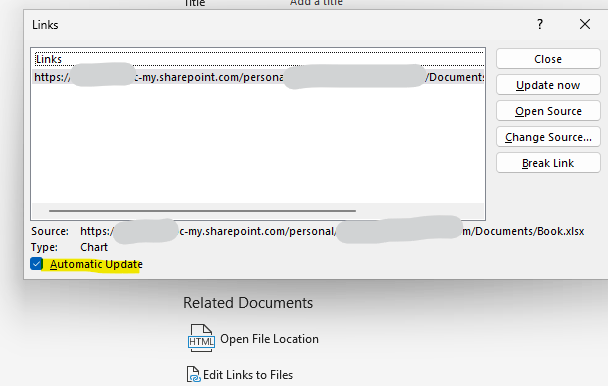
- In PowerPoint, click File > Info > Edit links to Files. Turn on the Automatically Update checkbox and try again. Still doesn't work.
- After closing the file and reopening, observe this pop up notification and click "Update Links". Again does not update.
- After checking the Edit links to Files, I see that the Automatically Update checkbox is checked. I again click "Update now", but no update is observed
- I click "Edit data in Excel" and change the chart in the opened window of Excel, click "Refresh Data" again, does not update.
- I open and close all windows, even restart the PC and open the PowerPoint and after clicking the the "Update Links" in pup-up, again does not update.
My PowerPoint and Excel versions are as follows and both are always on AutoSave.
Microsoft 365 and Office | PowerPoint | For business | Windows
Locked Question. This question was migrated from the Microsoft Support Community. You can vote on whether it's helpful, but you can't add comments or replies or follow the question.
5 answers
Sort by: Most helpful
-
Anonymous
2025-02-23T19:46:29+00:00 -
Anonymous
2024-11-23T04:47:30+00:00 Hi Han,
I went through your post carefully and deployed the tests based on the detailed steps you provided. Firstly, step3 is a default behavior, but the difference came when I did the step5. After I checked on the Automatic Update box, the linked chart in PowerPoint will keep updated. In this situation, it is suggested to Repair an Office application - Microsoft Support and test with two brand-new Excel workbook chart and presentation to see if the same issue will persist.
As it seems like the attached images about your Office version failed to upload successfully, you may send me again and here I created a private message channel for you: Private Messages - Microsoft Community
Please correct me if I made any misunderstanding and I will be here waiting for your updates.
Appreciate your time and patience. Hope you a nice day and stay safe!
Best Regards,
Mia
-
Steve Rindsberg 99,086 Reputation points MVP Volunteer Moderator
2024-11-24T03:34:59+00:00 Try the same procedure but with files that are stored on your local hard drive and are not in a folder that's synchronized with OneDrive or other cloud storage.
OneDrive seems to cause problems for PowerPoint/Excel + links. Testing this will verify that it's the problem or (if the problem occurs with local files) tell you that there's some other thing going wrong.
-
Anonymous
2024-11-25T15:43:33+00:00 Thank you for your reply.
An update on the question; I just noticed that the only things that change in the PowerPoint/Excel link, are only X and Y data when I change them, not other sections of the chart like when I add axis titles or trendlines and equations. But it updates the X and Y data and it means that the update link works.
But is there any way that it updates the other parts of the chart when I change its Excel file?
-
Anonymous
2024-11-26T05:21:14+00:00 Hi,
Thanks for sharing back with me and good to hear the data can get updated correctly. From my further tests, it seems like I can reproduce the same behavior that other sections of the chart like titles or axis titles are not updated even after the refresh update or manually reopen the presentation.
In this situation, I believe this is currently a feature limitation for linking a Excel chart into PowerPoint and please submit your feedback How do I give feedback on Microsoft 365? - Microsoft Support so that the Excel product development team can get informed of this and improve a better user experience in the coming updates.
Best Regards,
Mia