
How to remove
' cx='32' cy='32' r='32' /%3E%3Ctext x='50%25' y='55%25' dominant-baseline='middle' text-anchor='middle' fill='%23FFF' %3EAG%3C/text%3E%3C/svg%3E)
As Gi
1
Reputation point
Hey,
When the connection bar in the Remote Desktop app from the store shows,
placing the mouse in the lowermost or uppermost part of the screen brings up the taskbar or the window title. Is there any way to prevent it from doing that? In the regular mstsc.exe it doesn't do that.

Windows for business | Windows Client for IT Pros | User experience | Remote desktop services and terminal services
-
' cx='32' cy='32' r='32' /%3E%3Ctext x='50%25' y='55%25' dominant-baseline='middle' text-anchor='middle' fill='%23FFF' %3EA%3C/text%3E%3C/svg%3E) Anonymous
Anonymous2020-07-30T09:33:30.477+00:00 Hi,
Have you checked the answer? Does it resolve your question?
Please provide an update if you have any further question.
Thanks,
Eleven -
Anonymous
2020-08-03T07:09:18.693+00:00 Hi,
Have you checked if the answer helps?
If it helps, please do not forget to accept the answer.
Thanks,
Eleven
Sign in to comment
2 answers
Sort by: Most helpful
-
Anonymous
2020-07-29T04:48:27.033+00:00 Hi,
This should be an expected behavior if you display your remote desktop as full screen, which is designed so that you could go back to the local desktop.
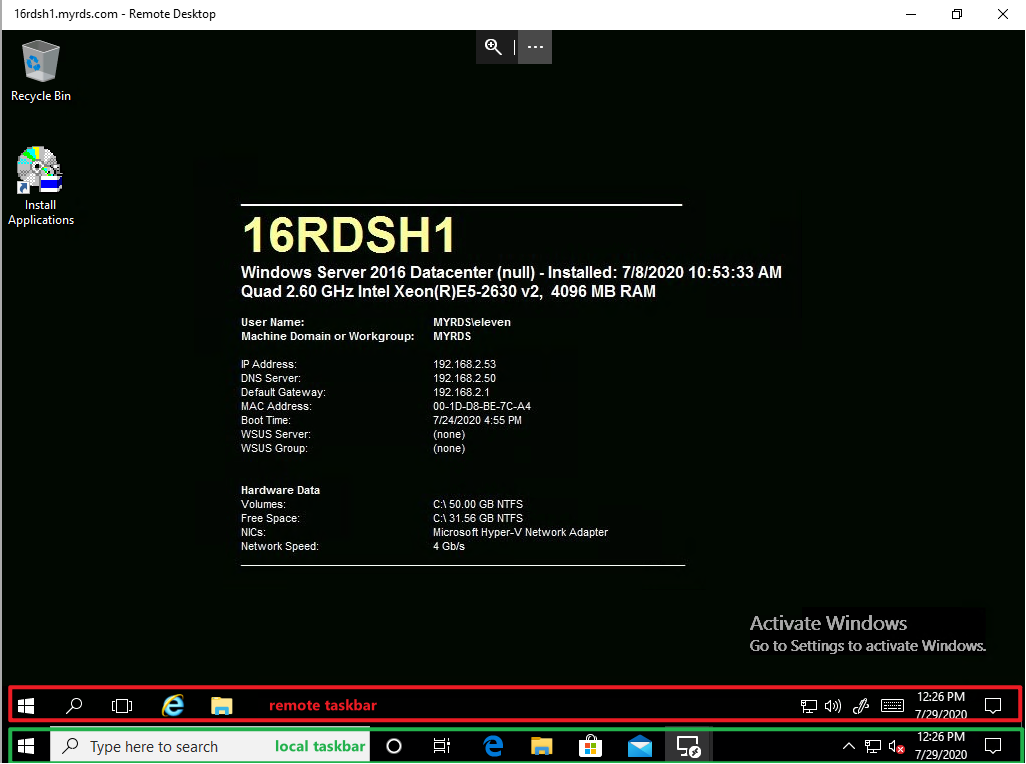
If you don't like such behavior, the only way is to not use full screen. Instead, you could just maximize the remote desktop as below. Then the local task bar will display on the bottom of the screen and above it is the remote taskbar.
If you must use full screen of the remote desktop, we could only hide the local taskbar or move the local taskbar to the right side of the screen like below.
But if you move the local taskbar to the right side, when your mouse move to the right side of the screen, it will still bring up the local taskbar.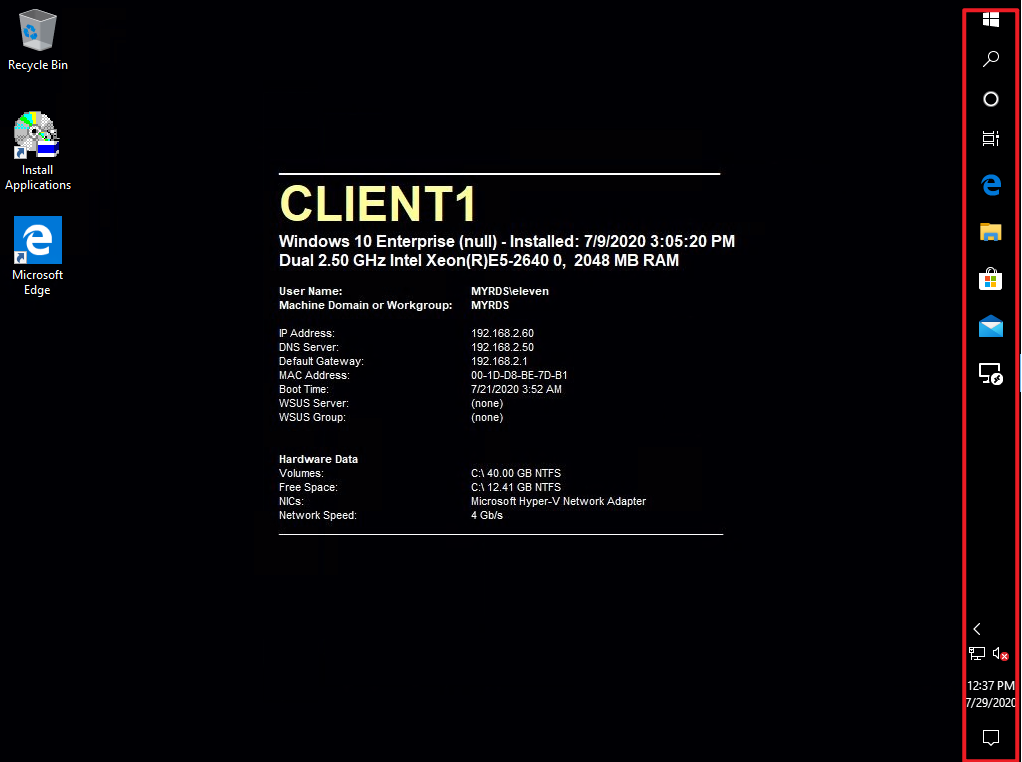
And for the window title on the topside, there is no way to prevent it from bringing up.
Hope the information helps.
Thanks,
Eleven
' cx='32' cy='32' r='32' /%3E%3Ctext x='50%25' y='55%25' dominant-baseline='middle' text-anchor='middle' fill='%23FFF' %3ES%3C/text%3E%3C/svg%3E)