Azure Machine Learning
An Azure machine learning service for building and deploying models.
This browser is no longer supported.
Upgrade to Microsoft Edge to take advantage of the latest features, security updates, and technical support.
' cx='32' cy='32' r='32' /%3E%3Ctext x='50%25' y='55%25' dominant-baseline='middle' text-anchor='middle' fill='%23FFF' %3EFM%3C/text%3E%3C/svg%3E)
This error occurs when I add a Metadata editor.
I want to Make the Fraud column a label for K-mean classification.

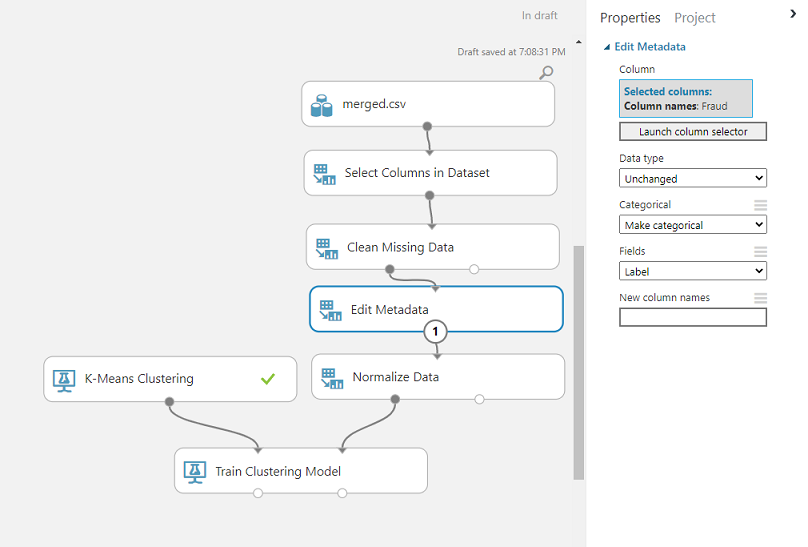
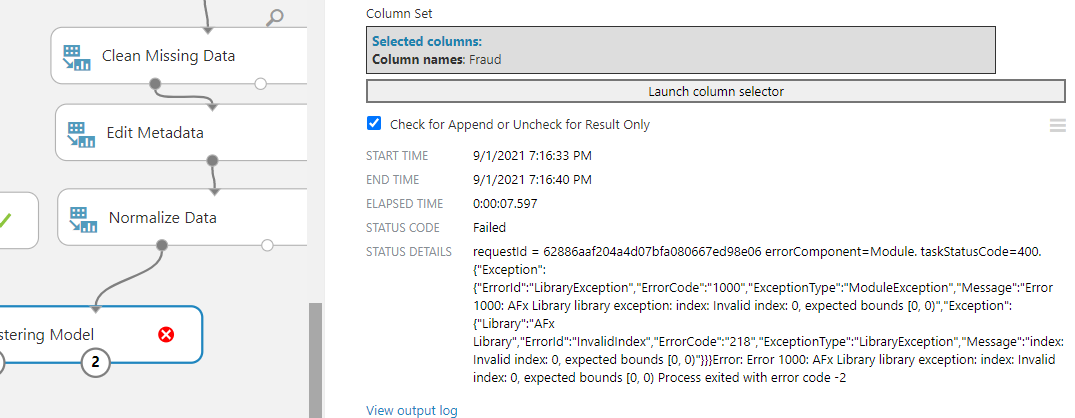
I tried to add another metadata editor to exclude Fraud from the features, but the previous editor seems to have already taken care of that.
An Azure machine learning service for building and deploying models.

@Fares Mhaya Did you get a chance to try the below suggestion?
Oh hey, sorry I didn't see the notification. Thanks for the answer!
I haven't tried it as of yet so I'll be sure to check and get back to you asap.
I did however substitute the normilization with a PCA filter and it worked without errors
@Fares Mhaya I think the error is because selected column "Fraud" is not renamed. As per the documentation of EDIT METADATA module all selected columns need to be renamed.
For New column names, type the new name of the selected column or columns.
- Column names can use only characters that are supported by the UTF-8 encoding. Empty strings, nulls, or names consisting entirely of spaces are not allowed.
- To rename multiple columns, type the names as a comma-separated list in order of the column indices.
- All selected columns must be renamed. You cannot omit or skip columns.
Please try to re-run after adding a new name. Thanks!!