Microsoft 365 and Office | Excel | For education | Windows
A family of Microsoft spreadsheet software with tools for analyzing, charting, and communicating data.

This browser is no longer supported.
Upgrade to Microsoft Edge to take advantage of the latest features, security updates, and technical support.
' cx='32' cy='32' r='32' /%3E%3Ctext x='50%25' y='55%25' dominant-baseline='middle' text-anchor='middle' fill='%23FFF' %3EA%3C/text%3E%3C/svg%3E)
Previously, when I double-clicked on a cell and held the click on part of the text, then dragged down, the text would be selected from that point to the end. But recently, this feature no longer works. Is there a setting for this? I want to do it with the mouse .
This is the same capability as **Control + Shift + Down Arrow** in an active cell, but it used to work with the mouse
Is the error related to Excel or Windows?
A family of Microsoft spreadsheet software with tools for analyzing, charting, and communicating data.
Locked Question. This question was migrated from the Microsoft Support Community. You can vote on whether it's helpful, but you can't add comments or replies or follow the question.
Hi nabihoseini,
Thank you for your further reply and cooperation.
Based on your reply, since our category is mainly focus on the general and build-in queries in Excel for Microsoft 365 for Business subscription, and your problem is related to Office LTSC Professional Plus 2021, I sincerely recommend you post the question in Excel Management - Microsoft Q&A, it is the specific channel handling this kind queries, members and experts are professional and will assist you further.
Appreciate for your patience and understanding.
Hope you having a nice day.
Sincerely,
Harry | Microsoft Community Moderator
Thank you
سلام نبی حسینی
با سلام. با تشکر از شما برای ارسال موضوع به انجمن ما.
من نگرانی شما را درک می کنم، به نظر می رسد وقتی می خواهید از ماوس برای انتخاب متنی به اندازه Ctrl + Shift + Down Arrow استفاده کنید، دیگر کار نمی کند. با توجه به موقعیتی که با آن روبرو شده اید، من ناراحتی ایجاد شده را درک می کنم و بابت آن بسیار متاسفم.
در این صورت، برای شناسایی علت اصلی مشکل، می توانم شماره نسخه اکسل (فایل > حساب > درباره اکسل) و نسخه ویندوز را تأیید کنم تا وضعیت را محدودتر کنم؟ لطفاً در پاسخ بعدی خود اسکرین شات مربوطه را در قالب زیر برای من ارائه دهید:
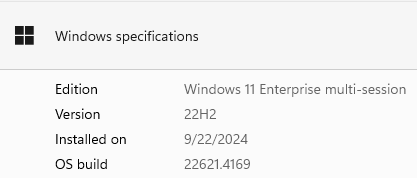
از درک شما قدردانی کنید که گاهی اوقات پاسخ اولیه ممکن است وضعیت را خیلی زود حل نکند. با این حال، ما می توانیم با هم برای محدود کردن و حل و فصل شرایط کار کنیم. لطفا اطلاعات خواسته شده را ارائه دهید تا بتوانم بیشتر کار کنم.
امیدوارم روز خوبی داشته باشید
با احترام
هری | مدیر انجمن مایکروسافت
[PII is masked by Harry Liu MSFT Support]
Hi nabihoseini,
Greetings. Thank you for posting the thread to our community.
I understand your concern, it seems when you try to use mouse to select text as functional as Ctrl + Shift + Down Arrow doesn’t work anymore. For the situation you’ve encountered, I do understand the inconvenience caused and feel very sorry about it.
In that case, to identify the root cause of your issue, May I confirm the version number of your Excel (File > Account > About Excel) and the Windows version to narrow down the situation? Please provide me related screenshot in the following format in your next reply:
Appreciate your understanding that sometimes the initial reply may not resolve the situation very soon. However, we can work together to narrow down and resolve the situation. Please kindly provide the requested information so that I can work further.
Hope you having a nice day.
Sincerely,
Harry | Microsoft Community Moderator