Microsoft 365 and Office | Subscription, account, billing | For business | Other
Microsoft 365 features that help users manage their subscriptions, account settings, and billing information.

This browser is no longer supported.
Upgrade to Microsoft Edge to take advantage of the latest features, security updates, and technical support.
' cx='32' cy='32' r='32' /%3E%3Ctext x='50%25' y='55%25' dominant-baseline='middle' text-anchor='middle' fill='%23FFF' %3EA%3C/text%3E%3C/svg%3E)
We are using Microsoft Defender portal to configure the settings for monotor reported messages. When we are saving it and open the outlook, we can see report button is still there. How to fix this issue? I will be very thankful if anyone can share their ideas yo resolve this. We had to engage our IT team and they advised us to contact Microsoft support. Thank you
Microsoft 365 features that help users manage their subscriptions, account settings, and billing information.
Locked Question. This question was migrated from the Microsoft Support Community. You can vote on whether it's helpful, but you can't add comments or replies or follow the question.
Answer accepted by question author
Hello VP Steve Wilsonn,
Good day. Thank you for posting in the community!
Sincere apologies for any inconvenience this issue might be causing you. It's a known issue by Microsoft. This issue has been escalated to the Microsoft Defender Team for a fix. We will update this topic as soon as the fix status is available. Below I am sharing the details:
ISSUE
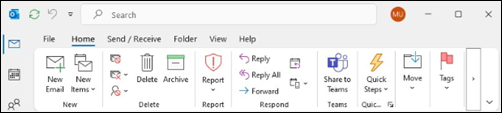
Using the Microsoft Defender portal, you configure user reported settings and set “Monitor reported messages in Outlook” to be “Use a non-Microsoft add-in button”. After saving these changes and restarting classic Outlook you find the Report button is still available on the Outlook ribbon.
STATUS: INVESTIGATING
This issue has been escalated to the Microsoft Defender Team for a fix. We will update this topic as soon as the fix status is available.
This feature is associated with Microsoft 365 Roadmap ID 371388. Additional specifics about the rollout are published for tenant admins to access in the Admin Portal as message center post MC841229.
Roadmap Link: Microsoft 365 Roadmap | Microsoft 365
If you find my provided solution useful, you can vote for it. With your vote, other users looking for the same details on this community site can easily find this topic.
Thank you very much for your valuable time and your cooperation.
Sincerely,
Md Ashabul Haque | Microsoft Community Moderator